
Product Documentation
Overview
Portfolixir is a self-hosted, local-first Phoenix application for managing a single portfolio workflow. It is intentionally narrow:
- Manual creation of securities, portfolio, accounts, and transactions.
- Bulk import of Portfolio Performance CSV/JSON v1 transaction exports through a preview-and-apply workflow.
- Holdings are derived from transaction history, with cost basis and unrealized profit/loss.
- Classification trees organise securities; per-category target weights drive a target/actual allocation breakdown with drift.
- Multi-currency portfolios are valued through stored exchange rates.
- Security prices are stored as quote history and shown in a security detail chart.
- Supported functions are available through the UI, JSON API, and MCP companion.
- No broker sync, bank sync, trading engine, payment flow, order flow, rebalancing, document ingestion, or AI-assisted behavior.
Product Modules
The codebase is split into local domain modules plus the web layer:
Portfolixir.Catalog- Securities and quote entities
- Security metadata and quote records
Portfolixir.Portfolios- Portfolios
- Cash accounts
- Depots
- Target weights and target/actual allocation
Portfolixir.Ledger- Manual buy/sell transactions
- Holdings calculation from immutable history
Portfolixir.Classifications- Custom and built-in classification trees and assignments
Portfolixir.Fx- Exchange rates and multi-currency conversion
PortfolixirWeb- Routes, pages, LiveViews, and JSON API
mcp-server/- TypeScript MCP companion that wraps the JSON API
Integration details for /api/v1 and mcp-server/ are documented separately in
API and MCP.
Core Workflow
- Create one or more securities with basic identifying data.
- Create one cash account and one depot, and link them (no portfolio decision anywhere — see below).
- Record manual buy and sell transactions with Decimal-based quantity and price values.
- Optionally import a Portfolio Performance transaction export through Imports, review the preview, map missing accounts, then apply atomically.
- Open the holdings view to verify current position per security.
- Record security quotes over time and keep history for reproducible charts.
- Review current holdings and quote chart behavior directly in the app.
Securities
Each security is a first-class object with stable identity fields and market metadata. They are the basis for all transaction and holdings calculations.
Asset class inference
Every security has an asset class. A class stored on the security always
wins: Security.effective_asset_class/1 returns it as it is. Only a security
with no stored class gets one inferred, when it is read, from its name and,
for crypto, its ticker. The ISIN is not one of the signals: the structure
of an ISIN alone does not say what kind of instrument it is (#408), so the
inference ignores it except in the last rule below. The rules run in this
order, and the first that matches decides:
- government_bond — the name says it is a sovereign bond: Bundesrepublik, Bundesanleihe, Bundesobligation, Bundesschatz, Staatsanleihe, Treasury Note, Treasury Bond, Treasury Bill, Government Bond, Sovereign Bond, “Republic of”, “Kingdom of”, or “Anleihe” at the start followed by a country (Australien, Belgien, Deutschland, Frankreich, Italien, Kanada, Niederlande, Norwegen, Österreich, Singapur, Spanien, USA, Vereinigte Staaten, United States).
- etf — the name carries ETF, UCITS ETF, U.ETF, UETF, ETC, ETN or ETP as a word.
- crypto — the whole name is a known coin (Bitcoin, Ethereum, Ether,
Solana, Cardano, Polkadot, Litecoin, Chainlink, Ripple, XRP, Dogecoin,
Avalanche, Tron), or the ticker is a known symbol (BTC, ETH, SOL, ADA,
DOT, LTC, LINK, XRP, DOGE, AVAX, TRX), alone or with a currency after a
dash or a dot (
BTC-EUR). - commodity — a physically backed precious-metal product (EUWAX Gold, Xetra-Gold, Physical Gold, Physical Silver, Physical Platinum, Physical Palladium, Gold Bullion), or a name that is only a metal: Gold, Silber, Silver, Platin or Platinum. A company with a metal in its name (“Muster Gold Corp”) is not matched here and goes on to the equity rule.
- A structured or leverage product, as its own class. These come before
equity because their names often carry an issuer’s legal form as well:
- knock_out — Turbo, alone or with one letter after it (TurboC, TurboP), Knock-Out, KO, Mini Future, O.End, Open End Turbo, WAVE, Unlimited Turbo;
- discount_certificate — DiscC, DiscP, Discount-Zertifikat, Discount Cap;
- warrant — Optionsschein, Warrant;
- factor_certificate — Faktor;
- reverse_convertible — Aktienanleihe, Reverse Convertible;
- bonus_certificate — Bonus-Zertifikat, Bonus Cap;
- express_certificate — Express-Zertifikat;
- and last, a bare Call or Put, which brokers use as shorthand for a warrant, so it is a warrant too (“Turbo Call” stays a knock-out).
There is no generic derivative class: a certificate that matches none of these words (an index certificate, say) stays unclassified.
- bond (#1127) — the name says it is a bond: Anleihe, Schuldverschreibung or Pfandbrief, also as the last part of a compound (Unternehmensanleihe, Inhaberschuldverschreibung, Hypothekenpfandbrief, but not Anleihenfonds), or Notes, Obligation or Obligationen as a word — and no structured-product word (rule 7’s exclusions; a certificate is legally a Schuldverschreibung too). It comes before equity because a bond’s name often carries its issuer’s legal form (“Muster SE Anleihe 2030”). “Bond” is not one of the words, because company names use it, and neither is a bare coupon and year (“Muster AG 4,10% 2028/2033”), which shares and funds carry too; Aktienanleihe, Bundesanleihe and a name with an ETF token are decided by the rules above.
- equity — the name carries a share or legal-form marker — Registered Shares, Reg. Shares, Registered Part. Shares, Inhaber-Aktien, Namens-Aktien, Vorzugsaktien, Actions, Aandelen, Common Stock, Inc., Corp., Corporation, Company, Co., Ltd., AG, SE, PLC, S.p.A., S.A. or SA, S.A.S. or SAS, SA/NV, Aktiengesellschaft, A/S, ASA, KGaA, Azioni, Acciones, Aktier — or a depositary-receipt marker (ADR, Sp.ADR, GDR, Depos. Receipts) or INH.ON, and no structured-product word (Turbo, Disc, Discount, Call, Put, Optionsschein, Zertifikat, O.End, Em.-u.Handelsg.mbH).
- fund — the name carries a fund issuer (iShares, Vanguard, Lyxor, Amundi, AIS-AM, Xtrackers, SPDR, Invesco, WisdomTree, VanEck, Fidelity, Deka) and none of the rules above matched; a name that also carries a legal form is equity by rule 7, which runs first.
- equity, from the logo (#408) — a security none of the rules resolved that has an ISIN and a stored company logo is read as equity: the logo lookup already decided it is a company, and the ISIN marks a listed instrument.
- Otherwise the security has no class: it is unclassified.
The rules ignore case, and most of them match whole words. Since issue #1078 that includes the legal forms “S.A.”, “SA”, “S.A.S.”, “SAS”, “Actions” and “Aandelen”, so a name that merely contains the letters “sa”, “actions” or “aandelen” (“Global Transactions Group”, “Muster Aandelenfonds”) is not read as equity; and the short exclusion words (Turbo, Disc, Discount, Call or Calls, Put or Puts, O.End, Em.-u.Handelsg.mbH), so a company whose name merely contains “put” or “disc” (“Muster Computer Corp”) is read as equity. Some markers still match as written, even inside a longer token: the equity markers Registered Shares, Reg. Shares, Registered Part. Shares, Inhaber-Aktien, Namens-Aktien, Vorzugsaktien, Common Stock, S.p.A., SA/NV and Depos. Receipts, and the exclusions Optionsschein and Zertifikat, so an “Indexzertifikat” or “Optionsscheine” stays excluded. A shorthand that fuses a product word into another, such as “TurboCall” or “CallOS”, is not recognised: such a name is read by its other words, and a legal form in it makes it equity. Setting the class by hand settles any case the rules get wrong.
When a class is stored. The class is not only inferred at read time. Each create or update of a security’s master data — in the app, over the API or MCP, or by an import — stores the class rules 1–8 give when no class is stored yet (the logo rule runs at read time only), and saving a security’s form stores the class the form shows, inferred or not. A stored class, whoever stored it, is returned as it is, so a later improvement to a rule does not reach that security. An improved rule reaches only the securities that store no class: those no name rule matched at their last write (the logo rule may still resolve them when they are read), and those reset to automatic with Unassign on the built-in asset-class tree (Classifications), which clears the stored class without inferring one.
Finding and fixing unclassified securities
A search or filter combination that matches nothing shows a no matches state naming the query or the active filters, with the controls still visible; the “no securities yet” onboarding hint appears only when the database holds no securities at all.
The securities list accepts an “is unclassified” filter on the asset-class
column (operator: :is_nil), the same condition as the Unclassified chip:
it matches every security with no stored class, whether or not a rule
infers one, because an inferred class is a guess and not a stated fact
(#700). Such a row shows its inferred class, marked as derived (≈), or nothing
when no rule fired, and either way an inline quick-assign dropdown, so the
class can be set directly from the list without opening the security detail
page. A row with a stored class shows it as a plain badge.
A stored class is a permanent override: once set it is returned by
effective_asset_class regardless of what the heuristics would produce, so the
quick-assign choice survives any future heuristic changes.
Deep-linkable filters
The securities list’s filter state lives in the URL, so any filtered view can be bookmarked or linked to:
?q=…— the search query.?holding=held|not_held— the holding status (the Held / Not held chips).?filter[]=column:operator[:value]— one or more column filters, e.g.?filter[]=asset_class:is_nil(unclassified securities) or?filter[]=currency_code:eq:USD. Operators match the filter popover’s set; unknown columns or operators are dropped.?cur[]=EUR&cur[]=USD— the currency chips; several compose as either/or.?class[]=etf— the asset-class chips, keyed on the effective class (stored or inferred), so they select what the list displays.?since=<ISO8601>— the Changed since cut (see below); the Today / 7 days / 30 days chips write a concrete ISO date here, so the link keeps meaning what it meant when it was shared.?dq=stale_quote|missing_quote|missing_logo|missing_fx|two_scales|implausible_quote— the data-quality shortcut filters: no quote in the last 7 days (including none at all); no quote at all; no stored logo; Missing FX (issue #717): priced, but with no stored rate from its currency to the base currency, so storing the rate empties the set; Priced on two scales (issue #1068): the bonds the two-scales guard names, in either direction (see Bonds below), the list the Overview’s two-scales count opens; and Quote does not match bookings (issue #1101): the held securities whose stored quotes contradict their own bookings (see A quote that does not match the bookings under Quotes and Charts), the list the Overview’s count of them opens. The first three leave a benchmark and a retired security alone: a sold-out or delisted security you retire leaves all three, and the Overview’s counts drop with it; reactivated, it is back in those it matches. The same conditions can be picked in the filter control under Data quality — the dashboard link is a shortcut to them, not the only way in. The agent asks for the identical sets overGET /api/v1/securities?data_quality=…and theportfolixir.securities.listtool; all of them are one definition, so a count of N always addresses a list of N.
The common filters are one-tap chips (issue #717): a fixed, named row above the table — Held · Not held · Unclassified · Stale quote · No price · Missing FX, then one chip per currency and per asset class in use. Chips are toggles; different families combine as AND, several chips within the currency or class family combine as either/or. Two of them encode a deliberate distinction: Unclassified is keyed on the stored class (a row whose class is merely inferred still counts as unclassified, because an inference is a guess, not a stated fact), while the asset-class chips are keyed on the effective class, so they select exactly what the list displays. The generic column/operator/value builder is demoted behind More filters at the end of the row; it still expresses everything it could before, and it carries a count whenever it holds conditions the chips cannot express — a demoted control never hides active state.
Searching, toggling a chip, or applying a filter updates the URL in place, and selecting a security keeps the active filters. The Overview data-quality line links here with the matching filter pre-applied.
Changed since (issue #731) answers “what moved lately?” from the same cut
the agent polls with: the chips narrow the list to securities created or
changed strictly after the cut, judged by the record’s change instant. The
page states the property that makes such a delta honest — deletions are not
shown; clear the filter for the complete list. The URL parameter is the
API’s ?since= with the same accepted forms, so an agent’s link opens
exactly the slice it read; an unparseable value degrades to the unfiltered
list rather than silently narrowing it.
On the phone (issue #799, UX-DR27; issue #800): under 560 px the table gives way to two-line rows — the name over its ticker, ISIN and asset class (the assign-class control where the class is missing), the latest price over the day change on the right, the stale marker under the price, “no price” where nothing prices the row — so nothing scrolls sideways; the row still opens the detail, its kebab still opens the row menu, and the column picker keeps its meaning above 560 px. The chip families move behind one Filter (n) control that carries the count of active chips and opens a bottom sheet — a dialog with the families stacked under their names, the More-filters builder, Reset and Done; a chip in the sheet applies at once, exactly as in the row.
A row whose security went elsewhere. When the agent, the API or another tab deleted or merged a security after the list loaded, a row action on its row reloads the list instead of doing nothing, closes a detail pane open on it, and says why the row went: ““…” was deleted meanwhile; the list is reloaded.” or ““…” was merged into … meanwhile; the list is reloaded.”, the security that now carries the history linked. The note is brought to the top of the window and takes the keyboard focus, since the menu that had it went with the row. The new-security dialog answers the same way (issue #1072): when the security its search matched (“This security already exists”) was deleted or merged away before Merge online fields or Update existing was pressed, the dialog closes, the list reloads, and the same note names the match.
Classification columns
Next to the attribute and price columns, the securities list’s column picker offers one entry per classification tree and level — custom trees and the built-in asset-class and currency trees alike, matching Portfolio Performance’s classification columns. An enabled column shows each security’s assigned category on that level: a security assigned to a deeper category shows its ancestor on the chosen level, one assigned above the level (or not assigned at all) stays blank. Classification columns sort like any other column, with unassigned securities always last, and persist in the browser together with the rest of the column choice. They are display columns only — filters stay on the attribute columns.
Letter-spaced names from Portfolio Performance
Portfolio Performance sometimes exports names with a space between every
character — e.g. I b e r d r o l a S . A . A c c i o n e s. The JSON
parser detects this pattern (majority of whitespace-separated tokens are
single characters, minimum four tokens) and collapses the tokens before
heuristics run, so legal-form suffixes are reliably detected even from such
exports.
ISIN changes (former-ISIN aliases)
When a corporate action gives a security a new ISIN (a merger rename, a
re-domiciliation), record the change instead of editing the ISIN in place:
POST /api/v1/securities/:security_id/isin-change (or the
portfolixir.securities.isin_change MCP tool) moves the current ISIN into a
journaled former-ISIN alias and writes the new ISIN onto the same
security. Imports then keep matching in both directions: an old export still
carrying the former ISIN resolves through the alias, and a new export with
the new ISIN resolves through the current ISIN — no duplicate security, no
duplicate bookings (the import marks such rows as “matched via former ISIN”).
Aliases are correctable: they are listed on the security detail
(GET /api/v1/securities/:id) and can be deleted (journaled) when recorded
by mistake. A plain rename needs no ISIN change — it is just a name edit.
The new ISIN must be a valid ISIN, check digit included, and so must an ISIN,
a WKN (six letters or digits) or a ticker (printable ASCII) edited on an
existing security: a lookalike never replaces the identifier your exports
carry. A security’s name is stored without invisible format characters.
Merging a duplicate security (ADR-0050 §9)
When one instrument exists twice — an export carrying a newer ISIN was
imported before the ISIN change was recorded and created a second copy with
a second copy of the history, or a security created by hand was created again
by the next import — merge the duplicate into the security you keep:
Merge into… in the duplicate’s row menu on the securities page, or the
same button in the Cannot delete dialog when bookings, quotes or events are
what block the delete. That dialog counts what still references the security
(““…” still has 12 bookings, 840 quotes and 3 research entries.”) and says
why its way out is what it is: research entries are never removed and no
merge carries them, so a security with research entries is retired instead.
Your agent has the same merge
(GET /api/v1/securities/:id/merge_preview and
POST /api/v1/securities/:id/merge, or the
portfolixir.securities.merge_preview and portfolixir.securities.merge MCP
tools), and both read the same preview.
The preview shows everything the merge does before anything is written: each depot’s position of both securities before and after, the bookings that appear on both (you decide whether they are duplicates — nothing is preselected), the splits that coincide, the quotes, the classification and plan rows, the calendar events and the identifiers. What the merge does:
- Bookings move onto the security you keep, in every depot; a booking you confirm as a duplicate is deleted, and a split both carry on the same day is kept once. Every day’s quantity in every depot is checked against both histories.
- Quotes fill the gaps of the security you keep; on a day both have a quote, the kept security’s wins. A close you typed by hand that would be dropped this way is listed first. The dropped closes stay in the merge record.
- Classification and plans: an assignment moves where the kept security has none in that classification, otherwise the kept one’s stays; a position target moves, unless the plan already has one for the kept security or it would no longer sit under the kept security’s category — then it is removed, and the preview says why.
- Events move; two of the same kind on the same day are listed as a possible duplicate for you to clean up.
- Identifiers: when both carry an ISIN you choose, without a default, which one the kept security answers to — keep its own (the duplicate’s ISIN becomes a former ISIN) or take the duplicate’s (its own becomes the former ISIN; this repairs the duplicate an export with the newer ISIN created before the change was recorded), optionally with the day the ISIN changed. A WKN, ticker or quote feed the kept security lacks is taken over — unless it breaks the rule a changed identifier must meet (a WKN of six letters or digits, a ticker of plain ASCII characters), which the master data then show as not adopted; its name, asset class and logo stay.
In the dialog, the first step searches the security to keep by name, ISIN, WKN or ticker. A match that cannot take the duplicate’s history stays in the list, disabled, with its reason: another currency, only one of the two a benchmark, retired, or another quote basis. The second step previews exactly that pair, starting with two cards — the names are often equal, so each shows its ISIN, its bookings and the day it was created. The ISIN choice follows as two options, each saying which ISIN becomes the former one; neither is preselected, and Adopt asks for the day of the change. Then the holdings in shares before and after (and after removing the equal bookings), the counts, the equal bookings with their own choice, the closes you typed by hand that the kept security’s quotes replace, the settings that move or are dropped, the events that stand on both, and the master data that differ. Merge into … stays disabled, with the missing choice named beside it, until every choice the pair needs is made. After the merge the security you kept opens with the result above the table, and its overview line names the former ISIN and the merge (merged on 2026-09-26 from “…” (then …)).
The merge is refused, with the reason, where it cannot keep everything exact: different currencies, one a benchmark and the other not, research notes or a policy rule on the duplicate (merge the other way if that passes, or keep both), positions in different views, splits that disagree (two ratios on one day: delete the split with the wrong ratio), a split of the duplicate that still carries an import hash from before the import-hash check (the dialog names it: change its kind back, or delete it), an ISIN of the duplicate whose check digit fails (correct or clear it in its master data first), or an identifier of either security — as stored, as its Portfolio Performance import recorded it, a former ISIN, or that of a security merged into either before — that would no longer find the kept security. The dialog names every reason at once, each rule by name, and offers Merge the other way where that direction passes; where it is refused as well, both reasons stand and nothing else is offered. That last check is what makes the next import safe: after a merge, re-importing any export already applied creates nothing, whichever ISIN it carries, and new rows under the duplicate’s identifiers are booked once, on the security you kept. A read of the duplicate’s id afterwards answers with the security it now lives on, and so does the screen: a link or bookmark to the duplicate’s page opens the security it was merged into, with a note saying so and the day of the merge, and a benchmark that named the duplicate switches the Wealth page’s comparison to that security, with the same note under the performance heading. There is no unmerge; the merge record and the audit journal show what it did.
Identity fields that freeze (ADR-0050 §11)
A security’s currency freezes once it has a transaction or a quote: its
bookings and its price history are stated in that currency, so changing it
would silently re-denominate them. Every path refuses the change with a field
error that counts what froze it — is frozen once referenced (120 quotes,
3 transactions) — and writes nothing: the edit form (under the currency
select), the search dialog’s Merge online fields and Update existing
when the picked listing trades in another currency (a Xetra listing in EUR of
a security booked in USD is a different price series, not a correction), and
PATCH /api/v1/securities/:id with the MCP tool over it (422). The other
fields stay editable, and a security with neither bookings nor quotes still
changes currency. The same rule holds for accounts, see Accounts and
Depots below.
Derived metrics on the chart tab (issue #814’s sibling, ADR-0047)
The detail pane’s Chart tab carries the security’s derived metrics under the price history they describe: SMA-50 and SMA-200 with the latest close’s distance to each — drawn as the chart’s second and third series, so a crossing is visible and not something to be reconstructed from two numbers — plus volatility, the maximum drawdown, momentum and the distance to the 52-week high and low.
One period control: the metrics follow the chart’s own range buttons. The stored windows are 30, 90 and 365 days, so a range snaps to the nearest at or below it and each cell names the window it was measured over together with its observation count. Below its minimum a metric reads not computable and still shows how many observations it had — the average of too little data is not a small number, it is no number.
The figures are over this security’s own split-adjusted closes, in its own currency, never converted: a price metric is a statement about the instrument. A day without a stored close produces no return observation, so nothing is carried forward and then differenced. The block reports; it does not evaluate — there is no signal, rating or recommendation anywhere in it.
Bonds: master data and key metrics (ADR-0052)
A security whose asset class is Bond or Government bond — set, or inferred from its name — carries its master data in the security dialog behind Edit: the section Bond data appears while the asset class reads one of the two, when creating and when editing. Its fields are the coupon p. a. in percent (2.5, not 0.025), the interest payment (annual or semi-annual), the maturity and an optional issue date (ISO dates, the maturity after the issue date), and the denomination (face value) with its currency, which starts on the security’s and is stored only with a denomination: a save without one stores no currency, and the nominal then reads in the security’s. Nothing is required; while editing, an emptied field clears its value, and the values are kept if the asset class changes away from a bond. When a search finds a security the catalog already holds, Update existing and Merge online fields write only the bond fields that are filled in: a blank field leaves the stored value alone. A value no bond carries — a coupon above 100 %, a maturity on the issue date, a grouped figure — is refused on its own field, and every refusal of one save shows at once.
The quantity convention. A Portfolio Performance export books a percent-quoted bond’s quantity as a hundredth of its face amount: 100 units are a nominal of 10,000, and a quote of 97.25 is both 97.25 % of face and the price per unit. So quantity × quote is already the market value, and the nominal held is quantity × 100. Every place the face amount is derived says so.
The bond’s Overview shows one more block under the six figures, headed Bond: the maturity with the issue date, the coupon with its payment, and the nominal held (“100 units × 100 EUR”, the denomination beside it), then what follows from them —
- remaining term: calendar days from today to the maturity, in years of 365 days and in whole years and months; matured on and after the maturity date;
- current yield = coupon ÷ price;
- yield to maturity, linearly approximated: (coupon + (100 − price) ÷ remaining term in years) ÷ price, without compounding.
The price is the one the valuation uses: the latest stored quote, or the last own trade price while there is none, and the figure says which. Accrued interest, fees and taxes are not included; the figures are reported, not evaluated. A figure whose input is missing reads not entered or not computable with the reason, never a number. With no master data at all, one sentence says what is missing and Enter bond data… opens the dialog.
No yield from a price per unit. While no quote is stored and the last own trade price is at most 5, both yields read not computable with the reason “trade price … per unit, not percent of face”: a bond bought at 0.984 per unit was booked with its nominal as the quantity, and 2.5 ÷ 0.984 would read as a yield of 254 %. The limit is the two-scales band below mirrored, 100 ÷ 20. A stored quote is a percent price at any level and is always used.
Priced on two scales. If an export booked a bond’s nominal as its quantity, every money figure of the bond — value, gain, weight — is a hundred times too high from the first quote on, and the TTWROR cannot show it. A bond whose latest stored quote is 20 to 500 times a booked price per unit — a buy’s, or a priced inbound delivery’s — (quotes near 100, bookings near 1) is therefore named in a problem note at the top of its Overview, with the quote, the booking and a link to its Transactions tab, where the quantity is checked against the nominal on the statement; and in the data-quality panel of Wealth → Holdings, where the total it inflates is read. Nothing is converted: the figures stay as booked until the bookings are corrected.
The reverse case is named too (issue #1068): stored quotes near 1 beside bookings near 100 — a latest quote 1/500 to 1/20 of a booked price per unit, and itself at most 5. The quotes are then not percent of face, and the bond counts a hundred times too low in every total. Wealth names it in a problem note of its own, each name linking to the security’s Quotes tab, where the stored quotes are checked; again nothing is converted. The security’s own Overview does not name the reverse case yet (#1112).
Which securities the guard reads. A security is read as a bond — its Overview shows the bond block, and the guard reads it — when its asset class is Bond or Government bond — set, or inferred from its name — or when it shows no asset class (none set, none inferred) and carries bond master data: a maturity or a coupon. The name inference recognises government-bond names and, since issue #1127, the explicit bond words of rule 6 (Anleihe, Schuldverschreibung, Pfandbrief, Notes, Obligation), so a corporate bond whose name carries none of them and that has no class is brought under the guard by entering its maturity or coupon (or by setting its class); the dialog shows its Bond data while the class reads blank, so the data can be corrected there. A bond whose name carries its issuer’s legal form but no bond word (“Muster AG 4,10% 2028/2033”) is stored as Equity when it is created, and so is one with a bond word created before issue #1127, whose stored class is kept; the master data alone does not change that: set its class to Bond (or Government bond). A security with neither class nor master data — an unclassed share that rose twentyfold, say — is never named; nor is a name the inference reads as a structured product, whose expiry may be stored as a maturity; and a security shown under any other class is no bond, whatever master data it still carries. A bond named without a class is marked no asset class in the note. The Overview’s data-quality line counts every bond priced on two scales, in either direction and catalog-wide, and links to the list of exactly those.
Dates tab (the security’s calendar, ADR-0048)
The Dates tab (German: Termine) lists the dated calendar facts recorded for the security — an earnings report, an ex-dividend or payment date, a lockup expiry, an index review, a shareholder meeting, a regulatory decision, a guidance update — in the research timeline’s shape. Each row says how well the date is known (announced, estimated, within a period, month known, day not), where it came from with the research log’s own source-quality vocabulary, whether it took place, and the day it was last re-read.
Those last two are different facts and the labels keep them apart on purpose. Announced says a source set this day; took place says the thing actually happened. A reporting date can be announced months ahead and still be waiting to happen, and a date nobody announced can pass all the same — which is why the Dates tab can show an announced row with no took place badge, and why that is not a contradiction.
An event books nothing: when a dividend is actually paid it is booked through the ledger as always and the event is marked as having taken place. It is never converted into a transaction.
What is due across the whole catalog — held securities and purchase candidates alike — appears as the Due card on the Overview, beside Off target and the data-quality line. A security with no position is marked no position rather than filtered out: a calendar built from the position list cannot hold a date for something not yet owned, which is exactly the date worth not missing. A date given as a range or a month counts as due when any day it could fall on is inside the horizon.
Research tab (the security research log)
The detail pane’s Research tab is the human view of the security research log (ADR-0044): what the operator or the agent knows about a security, as dated, sourced entries that are never edited and never removed. The tab shows the derived thesis state on top — status (None, Intact, Retracted), the current thesis text, conviction tier, invalidation condition, time stop, when it was last reviewed and by whom, and the entry it derives from — then the timeline newest first. Every entry shows its kind (thesis, evidence, invalidation check, event result, risk, retraction, decision), its source quality (primary source, several secondary sources, awareness, unverified), its as-of date and its author (operator, agent or local model; a machine-generated proposal is marked as such).
A wrong finding is withdrawn by appending a retraction that supersedes it: the retraction reads “Retracts #n” with the reason, the superseded entry stays in the list marked “Superseded by #n”, and a retracted thesis is called out above the timeline with the retraction’s reason. Nothing on the surface edits or deletes an entry, by design — the record of having been wrong is the point of the log.
The Append an entry form writes an entry as the operator: choose the
kind, state the source quality (it is set, never guessed), give the as-of
date (the statement’s cut-off, not today’s date, when they differ), and
optionally the source link, a valid until date for a dated block, and the
entry it supersedes. Choosing the Thesis kind reveals the thesis fields
(conviction, invalidation condition, time stop). The same log is readable and
writable over the API and MCP (/api/v1/securities/:id/notes and the
portfolixir.notes.* tools), including the three hygiene reads — held
positions with no entry for N days, entries that still need corroboration,
and dated blocks expiring within N days.
Invisible characters (E25). No text is stored any more with a character
that renders as nothing — a zero-width space, a direction control, a tag
character, a run of variation selectors: every form, the API, MCP and the
import refuse it, naming it (U+200B). An emoji built from several joined by
a zero-width joiner (a person at a laptop, the rainbow flag) is stored, since
the joiner renders as the emoji; the England, Scotland and Wales flags, built
from tag characters, and the zero-width non-joiner some scripts use are
refused. A text stored before carries an
Attention note where it is shown — “The text contains 2 invisible
characters.” (a name: “The name contains …”) — with what to do about it
and, behind Text with the characters made visible, the text spelled the
way the agent receives it (Auftrags[U+200B]bestand). In the research log
the remedy is Append an entry that supersedes #n, which preselects the
entry in the form; a security’s name is corrected with Edit master data;
a booking’s notes, a rule’s name and note, and the names of views, buckets,
categories, cash accounts and depots carry the note where they are edited,
and a clean retype removes it. Because the retyped name keeps the old
spelling as a former name, the rename dialog of a cash account or a depot
also marks its former names — “A former name contains 1 invisible
character. An import that writes it exactly so keeps booking to this
depot.” — so removing that entry is a choice made seeing it.
Benchmark securities. A security can be marked as a benchmark from its
row menu (“Mark as benchmark”): a reference series the portfolio is compared
against — an index proxied by an ETF, gold by an ETC — fed by the ordinary
quote sync, so there is no second quote source. A benchmark is never offered
in a booking form and the catalog’s data-quality reminders (stale or missing
quote, missing logo) leave it alone; it may still be held, and then it is
simply both. The API lists benchmarks with is_benchmark=true. What the
comparison shows is described under Performance.
Retired securities. A security you no longer hold and whose listing has
ended — sold out or delisted — stays in the catalog because its bookings do.
Retire in its row menu marks it so: it leaves the catalog’s data-quality
reminders (stale or missing quote, missing logo) and their counts on the
Overview, and a retired holding leaves the Wealth page’s data-quality rows
for a stale quote, a trade price and no price at all, because its stopped
feed is expected. The Missing FX reminder keeps it, because a missing rate
still breaks the valuation. The performance figure no longer counts its
stale quote as a market observation, so a later booking restates the basis
instead of reporting the gap as return, which can change past TTWROR figures
(#610). Reactivate in the same menu undoes it. Your agent retires a
security with portfolixir.securities.update and is_retired.
Accounts and Depots
The bookkeeping entities are cash accounts and depots:
- cash account: tracks available liquidity context
- depot/account: stores security positions linked to that cash account
The Accounts & depots page (Administration area) shows both in one table, one entity per row: each depot renders as a row with its linked cash account indented directly beneath it, carrying the account currency and the labeled per-account liquidity role selector (free cash, credit line, reserve); a cash account no depot links to gets its own row. A cash account shared by several depots carries its controls under its first depot only — later rows read shared — managed above.
Bucket chips (#559). Each row shows its bucket memberships as chips — the exclusive scope bucket as a filled chip, free tags as outline chips, tinted with the bucket’s color when one is set. When a depot and its cash account carry the same buckets, the pair shows one merged chip group spanning both rows. Since issue #806 every group states its scope as a sub-line under the chips — applies to depot and cash account, applies to the depot, applies to the cash account — so a cell can be read without touching it, and an empty set reads as the words no bucket rather than as a blank cell. The Buckets column head carries an ⓘ that says what a bucket is — a tag on depots and cash accounts that a view picks to narrow every figure to its accounts — and on a phone, where the head is hidden, the same ⓘ follows each chip group’s scope line (issue #1090). Tag separately moved out of the cell into the row’s kebab menu, which splits the group so each side can be tagged on its own (differing sets always render split). At most four chips are shown per group — further chips collapse into a +2 more control; pressing it expands the cell in place to show every bucket, and Show fewer collapses it again. The picker carries the full set as well. Long names (for example a long bucket tag set at an import) are truncated; hovering a chip reveals the full name. The chips are the grouping UI: the + affordance opens a small picker popover with the remaining buckets plus an inline New tag field that creates and assigns a tag in one step, and the × on a chip removes that membership. On a touch screen the × and the + are 44-pixel targets (#1085). Edits on a merged group apply to the depot and the cash account together. Every change is written through the audit-journaled bucket context; trying to add a second scope bucket is rejected with an inline message, because the scope dimension stays exclusive (ADR-0024).
One creation dialog (#491). The Add depot & account button opens a modal that creates a depot together with its linked cash account in one flow — or a cash account alone, or a depot linked to an existing account. The dialog optionally applies initial buckets: check existing buckets and/or type one new tag, and every record the dialog creates starts out with that membership.
No portfolio decision is required anywhere (ADR-0024): grouping happens exclusively through buckets and views. When a depot or cash account is created — in the dialog or over the API/MCP — its internal binding resolves to one deterministic default portfolio (the earliest record, or a freshly created “Default”), without asking.
Currency and binding freeze once referenced (ADR-0050 §11). A cash account’s currency, and its internal portfolio binding, freeze once a transaction references the account through either leg or a depot links to it; a depot’s binding freezes once a transaction references it. A change is refused with a field error that counts the references and writes nothing — booked history is never re-denominated or moved. Name, notes and liquidity role stay editable. The API never moves an account or a depot to another portfolio at all.
Names and former names (ADR-0050 §4). Two cash accounts never share a
name, and neither do two depots: a name another account of the kind carries,
as its name or as one of its former names, is refused when an account is
created or renamed, because a Portfolio Performance import that names it
already books to that account. A renamed account keeps its previous name as a
former name, so an export that still names the old account books onto the
renamed one; renaming back to a former name takes it back. While another
account of the kind still carries the old name as its name, the old name is
not kept, and an import naming it books to that other account. Accounts that
already shared a name before this rule stay as they are; renaming one of them
ends the ambiguity. The former names are listed on the API and MCP payloads
(former_names) and can be removed there; an import that still names a
removed name then creates a new account. On this page both live in the row
menu, see Rename, merge and delete below.
For worked examples — a household split, strategy views with their own target plans, translating Portfolio Performance habits, and excluding a position from steering — see the Buckets & Views Guide.
Rename, merge and delete (ADR-0050 §4, §7, §8, §10)
Every row — a depot, the cash account under it, a cash account on its own — has its own ⋮ menu, named for its row (Actions for Savings): Rename, Tag separately (on a depot tagged together with its cash account), Merge into… and Delete, in that order. On a narrow screen the menu opens as a sheet from the bottom and names its row at the top.
Rename changes the name only; currency and portfolio binding freeze as described above, and role and buckets stay in the row. Before you save, the dialog says what happens to the current name: it stays a former name of the account, so an import that still names it keeps booking here — or, while another account of the kind is still called that, it is not kept, and such an import books to that other account. A name another account answers to, as its name or as a former name, is refused at the field together with the account that holds it, and nothing is written. The row changing is the confirmation.
The same dialog lists the account’s former names; a name that arrived with a merge says on which day. Remove takes one away after a confirmation that says what it costs: An import that still names ‘Savings 2019’ will then create a new account. Under the account’s name the row shows the newest former name (former: …) and, on an account others were merged into, the newest merge (merged from Savings (old) · date), each with +N when there are more. The date of the merge is a link to its entry in Merges at the end of the page.
Merge into… joins two accounts that are really one — typically an account an import created a second time under another name. The account you merge (the source) goes away; the account you pick (the target) keeps everything. It takes two steps in one dialog:
- Target. The source is named with its currency, liquidity role, buckets, bookings and balance, and every other account of the kind is listed. Only an account with the same currency, the same liquidity role and the same buckets can be picked — for a depot, the same default buckets. The others are listed under Not selectable, each with its reason, so it is clear what to align first. Two accounts of the same name are told apart the way the import tells them apart: a cash account by its linked depots (“· at Depot 1”), a depot by its cash account (“· with Giro”).
- Preview. Nothing is written yet. For cash accounts the preview shows both balances and their sum, the bookings that move, the transfers between the two that are dropped (they cancel out once the two are one), the linked depots that move, and the set balances that are adjusted — each with its date and its value afterwards — or dropped. For depots it shows each affected position’s quantity, average cost and realized gain/loss before and after, and a split whose rounding differs once both histories are combined. Bookings that are equal in both accounts — same day, same kind, same amounts, typically one import that landed twice — are listed with two choices, remove as duplicates or keep both, each with the balance it leads to (for cash accounts); remove as duplicates also names what it changes outside the two, such as another account’s balance or a position’s quantity. Neither is preselected, and the Merge into … button stays disabled, with the reason beside it, until you choose.
Confirming applies exactly the plan the preview showed: the bookings, the linked depots and the adjusted set balances move to the target, the source’s names become former names of the target — so the next import under the old name books onto the target — and the source is deleted. The result is reported above the table (Merged Savings (old) into Savings: 151 bookings moved, 2 removed.). If either account changed while the preview was open, nothing is merged: the dialog shows the new preview, says what changed, and asks for the choice again. A merge that cannot keep every position in its views — two depots holding one security in different buckets, say — is refused in the preview with the reason and the remedy; Check again re-reads it after you have aligned the two. So is a cash merge that would have to store a set balance with more decimal places than an amount holds — a buy or sell booked without its amount, whose cash is quantity × price, can cause it — and one whose set balance still carries an import hash from before the import-hash check: the dialog names each set balance and booking by account, date and number, and says what to change. There is no unmerge; the merge record and the audit journal show what a merge did, and Merges below lists every merge.
Delete removes an account only when nothing references it — no booking, and for a cash account no linked depot — and asks once, naming the account. An account with bookings is not deleted: Cannot delete says what it still has and offers Merge into… instead, which is how an account with history goes away. A delete that meets a change made at the same moment deletes nothing and says so; try again.
Merges (ADR-0050 §12)
After the table of depots and cash accounts, Merges lists every merge this instance recorded — of cash accounts, of depots and of securities — newest first. The list starts collapsed under a line that counts it (5 entries · latest 2026-09-30); with more than a hundred merges it says the newest 100. Each row reads:
- the date and the kind (cash account, depot or security);
- source → target: the source in grey, because it no longer exists — its name lives on as a former name of the target — and the target as a link to its row on this page, or to the security’s page. A target that a later merge took away reads now in … with a link to where the bookings live today; a target deleted since reads a depot (cash account, security) deleted since;
- the result in the words the confirmation used (142 bookings moved, 6 removed; for a security also the duplicates removed, the splits collapsed with the target’s, the quotes added and the settings dropped). It opens into one line per table the merge changed — bookings moved and removed, each removal with its reason (duplicate removed, internal transfer dropped, same-day set balance dropped, split collapsed), set balances, former names, quotes, classifications, position buckets and the like — then the choice you made for equal bookings and, for a security, the ISIN where the source carried one (#1067), and the check the merge passed (Balance confirmed on 211 days; nothing to check for a merge whose source moved nothing, whatever its kind);
- by: Operator for a merge made on these pages, Agent for one an API or MCP token made.
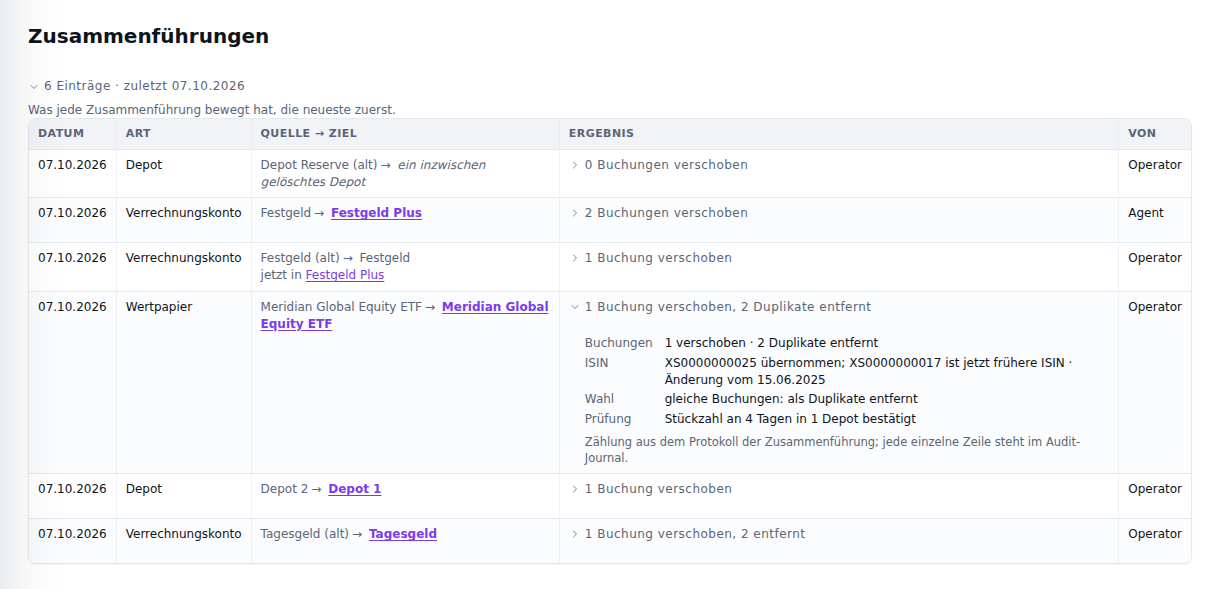
Merges on the synthetic demo dataset, in the German interface.
The date in a survivor’s merged from … · date line, and in a security’s merged on … from … basis line, opens the list at that merge’s result; a merge older than the newest 100 is said to be past the list. The list is read-only: there is no unmerge, and nothing in it writes. With no merge yet, it says where one starts — Merge into… in the row menu of every account, depot and security. On a phone each merge is two lines, source → target over date · kind · by, with the result beneath.
Your agent reads the same records with GET /api/v1/merges (MCP
portfolixir.merges.list), including the removed bookings per reason.
Portfolio records (compatibility)
Portfolios remain in the schema, the JSON API, and the import path as internal compatibility records only. The Accounts & depots page in the Administration area carries a collapsed, read-only Portfolio records (compatibility) panel listing every record — name, base currency, creation date, source (UI, API, Import, or Seeded, derived from the audit journal) and the count of bound depots and cash accounts — so records created over the API/MCP can never become invisible. There is no create or edit UI; the API write endpoints are deprecated (see API and MCP) and a follow-up story merges the records into buckets and views after two releases without external portfolio writes.
Transactions and Holdings
Manual Transactions
Transactions are explicit and auditable. A transaction defines:
- date
- security
- direction (buy/sell)
- quantity (Decimal)
- unit price (Decimal)
- optional taxes, fees, and notes
A transaction is booked in the currency of its linked cash account. Its currency must match that cash account’s currency (and, for a cash transfer, the counter cash account’s currency too); a mismatched booking is rejected rather than silently converted. Record the booking against a cash account in the same currency, or add one. No exchange-rate conversion of stored amounts happens here — exchange rates are only applied when valuing a portfolio in its base currency.
Recording a booking (issue #803; the 2026-09-12 review’s C6, variant C): the page opens on the history, and Record transaction in the history’s head opens a side drawer in the securities detail pane’s shape — the type, the date, the depot the booking books to (its cash account sets the currency), the security, quantity and price, costs and note behind one disclosure, the sell-lot preview beneath — a bottom sheet on the phone. Recording closes the drawer and shows the result above the history; Cancel or Esc discards the draft and returns focus to the control.
Correcting a booking (issue #809): every row of the history carries a kebab, and Edit in it opens that same drawer pre-filled with the booking — the same fields, the same validation, the same sell-lot preview. Saving corrects the row in place: no second booking is created, the derived holdings follow, and the change is recorded in the audit journal with the previous values as its before-image — the drawer says so under its title: “Corrects the booking in place; the derived holdings follow, and the journal records the change.” This is the human view of a capability the API and the MCP companion have had since before the two-way coverage rule; nothing new was added to either.
The kinds the drawer does not book (issue #912): the drawer records and corrects buys and sells. Edit on any other booking — a dividend, a deposit, a transfer, a delivery, a set balance, a split — opens the drawer notes-only: the booking’s own facts are shown and fixed (the type, the date and whatever the kind stores — the security, the cash account or both accounts of a transfer, the depot, the amount, the taxes, the quantity and price, each figure with the digits it was stored with), and only its note is editable (Save note; the audit journal records the change like every other). One help line says how such a booking is corrected: in place over the API or the MCP companion, or by deleting it and importing it again — for a booking an import brought in; one booked over the API or MCP is deleted and booked again there, and a set balance is set again under Accounts & depots — and carries Delete…, which closes the drawer and opens the delete confirmation below. Closing the drawer — Cancel, Esc, the close button or Save note — returns the focus to the row’s menu button, with “Booking note saved” in view.
A booked split is notes-only too (E25 S6): a split is a fact about the
security, booked through Record split on the security, whose checks
(the effective date, the positions, a conflicting ratio on the same day)
an ordinary edit would pass by. Its drawer shows the split’s type,
effective date, security and ratio, fixed. A wrong split is not corrected
in place: it is deleted — Delete split… in that help line — and
recorded again with Record split. The API and MCP answer a change to
anything but the note of a split row with 422.
Deleting a booking (issue #912): the kebab of every row carries Delete… after Edit, in red. It opens one confirmation that names the booking the way the history’s phone row does — the date and the kind over the security and the depot (or the account), the signed amount over its size — and says what changes: for example “Afterwards Depot 1 holds 40 fewer units of Global Equity ETF, and Checking has 2,504.90 EUR more.”, that holdings, balances, returns and trades are recomputed without the booking, and that the audit journal records the deletion with every value, while the booking itself cannot be restored. The confirmation is built from the booking as it is stored when Delete… is chosen. A quantity is stated at today’s count: a buy of 10 before a 2:1 split reads “20 fewer units”, which is what the holdings lose. Where a later set balance anchors that cash account, the clause says until when the account changes and the next sentence from when it stays as set: “… and Checking has 2,504.90 EUR more until 2026-09-30. From the balance set on 2026-10-01 on, the balance of Checking stays unchanged.”; a balance set on the booking’s own day means the account’s balance stays as set. A security whose name another security also carries is named with its ISIN, as the row’s menu names it. Delete transaction deletes it; Cancel, Esc or the close button change nothing and return the focus to the row’s menu button. The row disappears, the month’s count follows, and the result above the history reads, as a Note, “Transaction deleted: Buy · Global Equity ETF · 2026-09-22.”; a booking deleted meanwhile (by the agent, or in another tab) reads, as a Problem, “That transaction no longer exists.” — the one refusal the API knows. Each result carries its word and its glyph, not only a colour, and its × clears it (#1064). Accounts & depots, Views, Classifications and Risk answer their actions the same way. Nothing is checked beyond that, as over the API: deleting a buy whose shares a later sale consumed leaves that sale without its purchase.
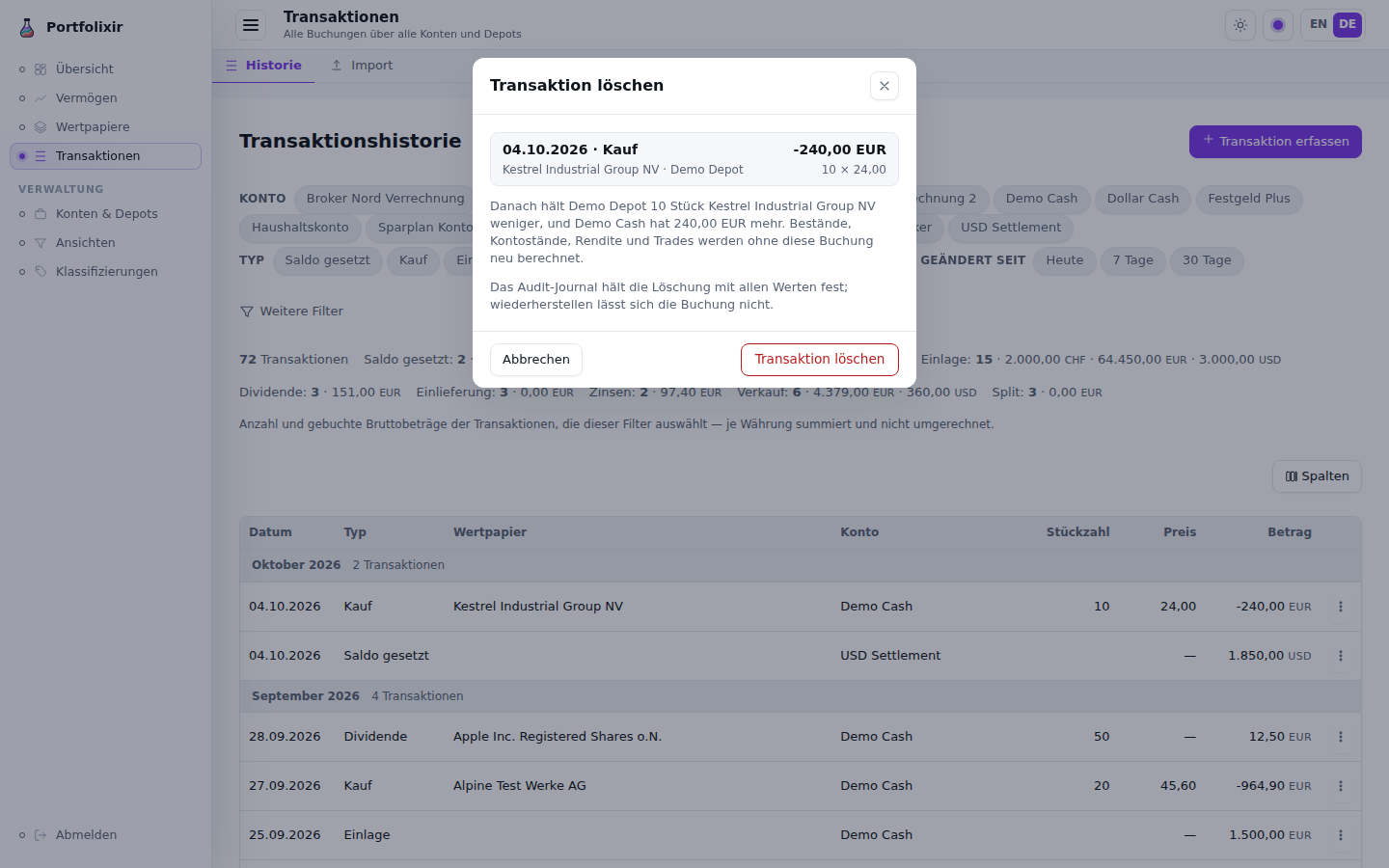
Deleting a booking on the synthetic demo dataset, in the German interface.
- An imported booking says so: once deleted, the import no longer knows it, so importing the same file again books it again. Only merging an account, depot or security retires that record.
- A split is deleted the way it was booked, as one fact: Delete… on any of its rows opens Delete split, naming the ratio, the number of rows and the portfolios whose rows go — “Delete split (2 rows)” deletes them all in one step, and the audit journal records the deletion; a split in one portfolio is named without a row count. The confirm deletes the rows the confirmation listed: one of them deleted meanwhile, the rest still go; a row added meanwhile (a re-book in another portfolio) deletes nothing, and the confirmation shows the split as it now is — “The split changed while this dialog was open. Nothing was deleted; the dialog now shows the new state.” — to be confirmed again. Afterwards the holdings count without the split from its date, the chart’s price series is computed without it, and stored quotes stay as they are; Record split then accepts the corrected ratio. Record split itself leads here: where a split with another ratio is already booked on the day, its warning names that ratio and carries Delete the booked split…, which opens the same confirmation on the security’s page. While that split stands, the preview’s Quantity after (at date) and Resulting position (today) read “—” (a screen reader reads “no quantity after: a different ratio is booked on this day” instead), and the warning says the preview shows no quantity after it (issue #1066): booking is refused until the booked split is deleted, so no figure after it would come true.
The API and MCP companion have the same two deletes:
DELETE /api/v1/transactions/:id (portfolixir.transactions.delete) for
one booking, and DELETE /api/v1/splits/:transaction_id
(portfolixir.splits.delete, an admin tool) for a split as a whole.
While entering a sell, the form previews which FIFO purchase tranches (lots) the sale would consume and the resulting gross gain per tranche and in total — sale proceeds minus the FIFO purchase cost of the consumed lots, before fees, priced at the entered price (or the latest stored price until one is typed). The figure is indicative and not a net figure; booking the sale changes nothing about how the cost basis is stored (holdings keep their moving-average basis, the trades tab keeps the FIFO matching). Lots are matched first-in, first-out across all depots, split-scaled like the trades view, and cross-currency tranches carry the same price/currency decomposition as the holdings — or an honest dash when it cannot be derived. An entered quantity larger than the open lots is flagged with the uncovered shortfall.
Reading the History
The history holds every booking across accounts and depots, of every kind, as the page’s subtitle says. It is filtered with chips above the table: one per cash account, and one per transaction kind actually present. Chips are toggles. Two chips of the same family mean “either of these” — two accounts show both accounts’ bookings; a chip from each family narrows to their overlap. The less common conditions — security, date range, free-text search — live behind More filters, which carries a count whenever it holds an active condition, so a demoted control never hides what is filtering the list.
Narrowing to exactly one account adds a Balance column: the balance that account stood at after each booking, in the account’s own currency. Two properties of that column are worth knowing:
- it is the same arithmetic as the account balance itself, so the most recent row equals what the accounts page shows;
- it is computed over the account’s whole history, not over the rows on screen. Narrowing the dates changes which rows you see, never what the balance was.
A row that does not move the selected account — a delivery, a split — shows a dash rather than repeating the previous row’s figure.
Each row’s Amount is the booking’s money as its cash account sees it: what leaves the account is negative, what arrives positive, and a set balance shows the level it set. A cash transfer moves two accounts, so its sign is the one in view’s: while the chips select its receiving account and not its sender it reads as money arriving (“200.00”, as the Balance beside it rises by 200); otherwise it reads from the sender (“-200.00”).
The summary above the table states the counts and the gross booked amounts per kind, with one total per currency. Amounts are never converted or added across currencies; converting them would make them a different figure needing its own rate basis. The rows are sectioned by month, and each month head carries the month and its count alone — September 2026, 6 transactions (issue #1083): a sum across buys, deposits, sales and a set balance would be neither a cash flow nor a turnover, so the sums stay in the summary, where its basis line says what they add.
Beside the account and type chips sit the Changed since chips (Today /
7 days / 30 days, issue #731): they narrow the history to transactions
created or changed strictly after the cut — by record change, not booking
date, so an edited old booking shows up while an untouched recent one drops
out. The note under the chips states the cut and the property that makes a
delta honest: deletions are not shown. The cut rides the URL as
?since=<ISO8601> — the same parameter, forms and semantics as the API’s
delta read, so a link the agent hands over opens exactly the slice it read; a
garbled value degrades to the full history. The Balance column is unaffected
by this filter, like by every other: it is always computed over the account’s
whole history.
The default columns are Date, Type, Security, Account, Quantity, Price and Amount. Account (issue #1084) names the cash account the amount moved through — the account whose view the amount is, by the same name its chip carries; a cash transfer names both, sender first (“Checking → Savings”), and a security transfer names both of its depots the same way (“Depot 1 → Depot 2”); a booking with no cash account, such as a delivery, names its depot; a split names none. Price shows a price with the digits it was stored with, up to four decimal places: 41.1234 stays 41.1234, 24 reads 24.00, and a price an import derived as amount ÷ shares, stored as 72.621176, reads 72.6212 — as it does on the security’s Transactions tab (issue #1073). A price under 1 keeps at least three significant digits, so it never reads as zero: 0.000045 stays 0.000045, and 0.001234 reads 0.00123. The security and account names wrap between words rather than widening the table, so at a desktop width the whole row stays in view, the price and the amount included; the dates and the figures never wrap.
Columns (issue #732) opens the history’s column picker — the human half
of the API’s fields= sparse fieldset. Beyond the default set it offers the
fields every booking already carries but the table never showed: currency,
fees, taxes and notes. A column choice made before Account existed is kept;
Account is then one tick away in the picker’s Booking group. The choice is
stored in the browser and survives a reload. The
Balance column is deliberately not in the picker: it stays governed by its
own rule — it appears exactly when the chips narrow to one account — because
a picker that could summon it outside that narrowing would show a
meaningless figure. The former Current holdings panel left this page
with issue #803: it duplicated Wealth → Holdings. Its column picker moved
with the holdings, to Wealth → Holdings → Positions (issue #814).
On the phone (issue #799, UX-DR27): under 560 px the history gives way to two-line rows under the same month heads — the date and the kind over the security or account the booking touched (both accounts of a cash transfer, sender first, as the Account column names them), the signed amount with its currency over the size (quantity × price, the price with its stored digits; the quantity alone; a split’s ratio) on the right, the running balance beneath it while the chips narrow to one account — so nothing scrolls sideways, and a long name with no space wraps inside its row (issue #1073); the column picker keeps its meaning above 560 px.
Holdings Calculation
Current holdings are not entered manually. They are derived from all transactions over time, so the state is reproducible and traceable. Held quantities move with buys and sells, with inbound/outbound deliveries (shares entering or leaving without a cash leg, e.g. a depot transfer from another bank), and with security transfers between own depots. Each holding also carries a moving-average cost basis and the unrealized profit/loss (absolute and percentage) against the latest stored price, in the security’s own currency. The cost basis follows the shares: buys (and inbound deliveries recorded with a price) add cost, sells and outbound deliveries take it out at the running average, and a security transfer carries the cost of the moved shares into the receiving depot. A delivery recorded without a price moves quantity at zero cost, since no own purchase cost is known for it.
For a security quoted in another currency than the money that paid for it,
each holding additionally splits its base-currency gain or loss into two
named parts (ADR-0033): the price return — the change of the security’s
own price, converted at today’s rate — and the currency return — the
effect of the exchange rate on the amount originally invested. Together they
equal the position’s total gain or loss in the base currency, exactly. For
positions in the base currency the currency return is exactly zero. A
position whose split cannot be derived from the recorded bookings (for
example an imported cross-currency trade with no stored rate at its booking
date) shows a dash instead of a guessed number; the
mix portfolixir.backfill_settlement_legs task derives the missing legs
for historic imports once rates for the booking dates are stored.
Booking one in the form (issue #395). When the security’s currency differs from the currency of the chosen depot’s cash account, the booking drawer shows a block “Settlement in EUR” (named after the account’s currency) with two linked fields: the settlement amount in the account’s currency and the rate — account units per one unit of the security’s currency. Typing one derives the other, and the one typed last stays as typed: after the amount from the broker statement, a changed quantity or price adjusts the rate, never the amount; a note, a fee or a date changes neither. Both are prefilled from the stored exchange rates on or before the booking date and say so — a suggestion, the broker statement wins; with no stored rate the block says that too and waits for the statement’s figure. The price is entered in the security’s currency, fees and taxes in the account’s. Saved, the booking is in the security’s currency, and its cash amount is computed from the settlement, fees and taxes, so the form never produces a booking the rule below refuses. A trade worth nothing (a free allotment at price 0) books without a cash amount. Editing such a booking to a security in the account’s currency removes its settlement figures and lets the cash follow the new quantity, price and fees. Before Sprint 15 the form booked such a trade in the account’s currency, reading the security’s price as if it were in euros.
The cash and the settlement agree (issue #395). A cross-currency buy
records the cash it moved (gross_amount, fees and taxes included) beside
the trade value in the account’s currency (settlement_amount); a sell
records the cash it brought in, net of fees and taxes. Since Sprint 15 a
booking is refused when the two disagree by more than one cent — a buy’s cash
must be the settlement plus fees and taxes, a sell’s the settlement less
them — and the message names the amount the settlement implies. The check
runs when a booking is recorded and when an edit changes one of those amounts
or the kind; editing the note or the date of an older booking is never
refused because of it. To list older bookings that miss the rule — read-only,
nothing is changed — run this against the instance’s database:
docker compose exec db psql -U portfolixir portfolixir_prod -c "
SELECT id, date, type, gross_amount, settlement_amount, fees, taxes
FROM transactions
WHERE type IN ('buy', 'sell')
  AND settlement_amount IS NOT NULL AND gross_amount IS NOT NULL
  AND abs(gross_amount - CASE type
        WHEN 'buy' THEN settlement_amount + coalesce(fees, 0) + coalesce(taxes, 0)
        ELSE settlement_amount - coalesce(fees, 0) - coalesce(taxes, 0)
      END) > 0.01
ORDER BY date, id;"
Correcting a listed booking is a decision about your own records: edit its amounts on the transaction history or through the API.
Classifications, Targets, and Allocation
The Classifications index (/classifications, issue #808) is one row
per tree, and each row says what that tree holds: how many categories and how
many levels it uses, how many of your securities are assigned in it — with the
unassigned count called out beside it — and the target plan it carries, whose
name reads under the tree’s name and whose status is the short word in the
row’s right-hand slot. The row itself opens the tree; the kebab at its end
carries Open and, for a custom tree, Delete; + in the heading creates a
new one. With no trees at all the index says so rather than rendering an
empty list.
Securities can be organised into classification trees. Custom trees are free-form folders with colours; built-in trees for asset class and currency are derived from each security and always present. Built-in tree names display through the locale (issue #729 — DE Anlageklasse / Währung), keyed on the tree’s stable key; your own trees keep the name you gave them in every language. The asset-class tree is an editable taxonomy: a security’s class is seeded from an inferred default and corrected by dragging it between categories.
A tree has at most 32 levels. Add under a category on level 32 is refused at the top of the page, naming the parent you picked, the level the new category would have taken and the bound; the form keeps what you typed (issue #940). The API refuses the same for a category it would create or move below level 32.
Each portfolio can store a target weight per category (a fraction of the portfolio, for example 25%). The allocation breakdown then compares, per category, the actual weight (its share of the valued positions) against the stored target and reports the drift — actual minus target (positive = overweight, negative = underweight; ADR-0023), both as a weight and as a base-currency amount, i.e. how much to sell (positive) or buy (negative) to reach the target. Securities held but not assigned in the chosen tree are summed into an unassigned bucket. Only the targets are stored; the actual side is derived from the live valuation on read.
A plan does not have to add up to 100%. Leaving it short on purpose — say, because one satellite category is deliberately not fully used — is a legitimate plan, and the gap is shown as an unallocated remainder: a named part of the plan meaning “this share is deliberately not steered”, not a mistake. Drift is then measured against the portion you actually steer, so the unallocated share is not spread across the categories that do carry a target as deviations you cannot act on. A warning is reserved for the two states that really are wrong: a plan summing to more than 100%, and a position-vs-category conflict.
Each category on the Classifications page also states what it cost, what it is worth now and what it has made — in euro and as a percentage. The percentage is money-weighted: the sum of the results divided by the sum invested, never the average of the members’ own percentages, which would let a tiny position at +300 % dominate a category that is flat in money.
Read the basis, stated once above the tree: these figures cover the positions filed in the category today. They are a statement about the current composition, not a period return — moving a security between categories moves its whole result with it. A position whose result cannot be derived (no usable price, or no exchange rate to your base currency) is left out of both sides of the sum and counted in the “covered of total” marker, rather than counted as zero, which would quietly understate the category.
The figures follow the tree as you edit it (issue #1110): creating or deleting a category, assigning, unassigning or moving a security, or moving a category under another parent computes them again, so a deleted category’s securities no longer count in its parent and the note on left-out positions no longer names a security that is no longer filed. Searching the tree or switching Current positions only narrows the rows and computes nothing; neither does renaming or recolouring a category.
The figures are in EUR, and the basis line says so first (“in EUR · Result:
today’s composition, …”). A position held in a portfolio whose base currency is
not EUR was not paid for in EUR, so it has no EUR cost to add: it is left out of
Cost and Result, and its cost is never converted, which would state a
cost nobody paid. A note between the basis line and the tree names it with the
category it is filed under and the cost it was paid, in its own currency — “1
position is not included in “Cost” and “Result” because its cost was not paid
in EUR: Harborline Freight Inc (Platforms), cost 1,500.00 USD. It is included in
“Value”.” The last sentence appears only when the Value column can value
the position. A security held in a EUR portfolio and in one outside EUR is left
out whole, with both costs (“cost 1,000.00 EUR + 1,500.00 USD”). The same note
names every other position the figures leave out, with its reason in words; past
one position it gives the count and lists them behind a disclosure. When nothing
is left out there is no note. Over the API, the screen’s read across every
portfolio is GET /api/v1/category-results, and the view read (GET
/api/v1/views/:view_id/category-results) applies the same EUR rule (#1091).
Every form of the read lists each excluded position per category with its
reason, and once per tree in excluded_members, with the category it is filed
under and, when only its currency keeps it out, its cost in the currency it
was paid in — the list this note shows.
The figures follow the view you pick (#1091). Under the tree’s name sits
the view switcher Wealth has — Everything, one chip per view, and
Views — and it is the screen’s one scope. Pick a view and every figure of
a category row reads it: Positions and Value count only the positions
the view holds, and Cost and Result are that view’s result across
every portfolio, in EUR, under the same rule — the read GET
/api/v1/views/:view_id/category-results answers, so the screen and the agent
never disagree. The basis line names the view first (“View Long-term · in EUR
· Result: …”; “View Everything” with no view picked), the note above names
only what the view’s figures leave out, and the plan editor below edits that
view’s plan. A member of a category that the view holds none of — held in an
account outside the view, or no longer held at all — is hidden with the
“current positions only” toggle and counted beside the category’s name as
+N not in the view, where Everything counts +N without holdings.
Unsorted follows the view the same way: it counts and values the unsorted
positions the view holds and counts the rest beside its name. Like the
categories, it follows the “current positions only” toggle in every scope:
under Everything it counts and values the unsorted positions still held and
counts the others beside its name as +N without holdings; with the
toggle off it lists every unsorted security. A view whose buckets
match no account says so above the tree, in Wealth’s words, instead of
leaving every row at “—”. A chip is a navigation, as on Wealth: the view you
pick here is the active view on Wealth too, and the other way round. A dot on
a chip marks a view that carries a plan for this tree — the plan the editor
below shows, active or draft; a cash target alone is not a plan of this tree
(Wealth’s chips keep their own rule, below). If the view is deleted while the
page is open (in another tab, or over the API), saving, creating or deleting
a plan writes nothing: the page falls back to Everything and says so, and the
answer at the top of the page names the view and says that nothing was saved
(created, deleted).
Per-position targets (ADR-0030, #481). Target weights can now be set down to an individual position (a security under a category), not just per category. Positions are the source of truth: a category’s effective target rolls up from its positions (their sum), and if a category also carries its own explicit weight the mismatch is surfaced rather than silently dropped. This first slice ships the data model and the API/MCP surface — set a position target by adding a
security_idto a target entry, read the position rows and category roll-up via the position-targets endpoint/tool (see the integration guide). If a security is later reclassified or unassigned, its position target keeps counting under the category it was filed under and is flagged as stale in the position-targets read — re-file it to move the weight. Since slice 2a the allocation view displays position SOLL/drift — including positions not yet held (IST 0, not held marker) — and the category rows steer by the effective roll-up. Since Sprint 15 the plan editor on the Classifications page takes position targets as well (see “Position targets in the plan editor” below); an even-split auto-distribution is not planned.
Editing a target plan on the Classifications page
Target weights are not global: a target plan belongs to a view (see ADR-0020).
A plan is edited on the Classifications page, in the Target plan
section of a custom tree’s detail pane. It edits the plan of the view the
screen reads — the one picked in the view switcher under the tree’s name —
and its head says which (“for view Long-term” beside Target plan / German für
Ansicht Langfrist; “for view Everything” with no view picked, the
portfolio-wide plan that behaves like a single global target set). Since
#1091 the section has no selector of its own: picking another chip loads that
(view, classification) plan’s stored weights and cash target — Everything
and each named view carry independent plans, so the same tree can hold a
different 100% plan per view, or none.
The states are:
- No plan yet. The section shows an empty state with Create plan (Plan anlegen) and, when another view already has a plan for this tree, a Copy from another view… (Aus anderer Ansicht übernehmen…) picker that prefills the editor from that source plan; the no-view plan is listed as Everything. Nothing is written until the plan is saved.
- A plan exists. Each category gets a Target % input and there is a
Cash target input below them; Save plan writes the whole
(view, classification)plan at once. A live Σ footer sums the category weights plus the cash target, updating on input: a ✓ at exactly 100%, a ✗ with the yellow mismatch cue above 100%. A plan under 100% is a choice, not an error (ADR-0040): the Σ carries no mark, and a muted last row Not allocated (Nicht verteilt) shows what the plan leaves unallocated. A parent category whose children carry weights shows their sum beside its name (children Σ), in the mismatch colour when it disagrees with the parent’s own weight; it follows every input as the Σ footer does (a child that follows its position targets counts with their sum), and it never blocks saving. - Delete plan (Plan löschen) removes the view’s plan; the Wealth page then falls back to actual-only (no target, no drift) for that view.
Weights are entered and shown as percentages (e.g. 60), stored as
fractions in [0, 1]. Inputs are labelled and keyboard-focusable, and the same
plan is equally reachable over the API/MCP target endpoints with a view
parameter.
Position targets in the plan editor (issue #481, Sprint 15). Each category
with assigned securities offers Positions (n) beside its name; it opens the
category’s securities as rows of the same table, each with its own Target %
input — the same form, one Save plan, one live Σ. A category opens by
itself when any of its positions carries a target. Once a position under a
category carries a target, the category’s own field turns into a dashed,
read-only Σ positions figure: the category is the sum of its positions
(ADR-0030 §2), and the Σ footer counts that sum in its place. Saving writes the
category’s own weight to that sum too, so the Wealth page’s “position targets
and category weight disagree” note is resolved by saving here. An empty
position field means “no position target” — never zero: clearing a stored
position’s field and saving deletes that target and hands the steering back to
the category, while 0 is a target of zero and is kept. Closing a category’s
positions only hides the rows; their values still save.
A save is one transaction: a refused save — a target above 100 %, a security filed under a category it no longer sits in — changes nothing, the clears included. A target more precise than four decimal places in percent, or outside 0–100 %, is refused with its row named first — “Position target of “…” under “…”: at most four decimal places in percent”, “Target of “…”: must lie between 0 and 100 %”, “Cash target: …” (issue #945) — and the inputs set no range or step of their own: the store, not the browser, decides, so the refusal on screen is the one that names the row. The answer to a save stands at the top of the page. A refusal is brought into view and takes the focus, and the input it names is marked as invalid until the next answer; dismissing the refusal returns the focus to that input. “Plan saved” shows there without moving the page. When a save clears a category’s last position target and no weight is typed for the category, the category’s weight that only followed their sum is removed with them, so the category is left without a target rather than holding a figure nobody typed. A stale position row (its security was moved to another category since) still shows where it was filed; sent back unchanged it is left as it is, and changing it is refused with the reason — clear it there instead. Copying a plan from another view copies its position targets as well.
Plan versions: duplicate, draft, activate
Since ADR-0027 a plan is a named version with a status — active, draft or archived — and a scope carries at most one active plan. This is how a strategy is restructured without losing the old plan:
- Duplicate plan (Plan duplizieren) copies the current plan (category and position target weights and cash target) into a draft; the editor switches to it and a plan version picker takes the plan’s name’s place in the editor’s version row, beside Duplicate plan, once a scope has more than one version.
- Editing and saving a draft never touches the active plan — the Wealth page keeps following the active plan, and a hint in the editor says so. The cash target row shows the active steering value (counted into the Σ check) but is locked while a version is edited, with a visible note: the cash quote stays with the active steering until the switch (v1).
- Activate this plan (Diesen Plan aktivieren) swaps the draft in; the previously active plan is archived in the same transaction, so old and new plan stay side by side for reference.
- Rename (Umbenennen) renames the selected version — e.g. to drop a “(Entwurf)” suffix after activation.
- Delete plan on a draft or archived version removes just that version, with its category and position targets; on the active plan it keeps its ADR-0020 meaning (the scope falls back to actual-only).
Every plan write is recorded in the audit journal.
Migration note (ADR-0020). The move to per-view plans is loss-free: any pre-existing target weights and the former portfolio-wide cash target become the Gesamt plan (
view = null). Nothing changes in behaviour — the existing setup simply appears under Gesamt, and the Wealth page reads it under the Total view exactly as before. Named views start with no plan until one is created or copied. (Since #1091 every screen calls this no-view scope Everything, German Alles.)
To keep a position out of the allocation steering basis while it still counts toward total wealth — for example a Bitcoin held as a long-term store of value rather than part of the steered mix — tag the security with a bucket and exclude that bucket from the strategy view, then read allocation under that view. The position then falls outside the view’s scope: it disappears from the 100% and the drift table, raising every other category’s actual percentage consistently, while total value, holdings, and performance (read without the view) are unchanged. (This replaces the former per-security “excluded from allocation targets” flag; see ADR-0013/ADR-0018.)
Classification trees are hierarchical, and the allocation rolls them up: a position assigned to a sub-category counts toward that sub-category and every parent above it. So if Growth holds a 50% target and holdings are assigned only to its sub-categories (Tech, Emerging, …), Growth’s actual weight is their sum — not 0% — and its drift is measured against that sum. The drift table lists categories in tree order with sub-categories indented under their parent; because each parent already includes its children, the displayed actual percentages add up to 100% only across the leaves (plus unassigned), not across every level.
Targets stay loose on purpose: a weight can be set at the top level and at sub-levels without the app forcing them to add up. To keep that freedom while making divergence visible, the Wealth page shows two advisory consistency hints — read-only, never blocking a save:
- A subtle line under each parent that has child targets reads subcategories: X% of Y%, where X is the sum of the direct children’s targets and Y is the parent’s own target. It turns yellow when X and Y differ.
- The allocation header shows Σ target top level: Z% — the sum of the top-level categories’ targets plus the cash target — highlighted when Z is not 100%.
Equality is checked exactly (to the stored weight precision), so a hint only highlights when the numbers genuinely differ. The hints are guidance only; the target save path is unchanged and never rejects freely chosen weights.
Cash is part of the allocation. A portfolio can store a cash target
(cash_target_weight, e.g. 5%) — the target share of cash inside the same 100%
basis as the categories. With a cash target set, the allocation’s 100% basis is
securities (within the active view) + the deployable cash (free-cash accounts
with a non-negative balance). The drift table then shows
a dedicated Cash row in its own neutral colour with the cash actual, target
and drift, the sunburst gains a cash segment, and every category percentage
shrinks accordingly once cash joins the basis. Set the cash target in the plan
editor’s Cash input on the Classifications page (per view), or over the API
(PATCH /api/v1/portfolios/:id) or MCP (portfolixir.portfolios.set_cash_target),
or clear it with null to stop steering a cash quote.
Currency allocation: cash by currency. When the active classification is the built-in Currency tree, each cash account’s balance is attributed to its own currency bucket instead of appearing as a separate “Cash” lump: EUR cash flows into the EUR category, USD cash into USD, and so on. Foreign-currency balances are converted to the base currency via the EUR hub before being added, so the percentages stay in the portfolio base currency. The total basis (securities + deployable cash) is unchanged — only the attribution of cash to a currency category changes. This gives a complete view of currency exposure including cash without a separate row. The asset-class view is unaffected: it keeps cash as its own Cash steering row.
Exchange Rates and Valuation
Portfolios can hold securities and cash in several currencies. Exchange rates are stored against a EUR hub (with European Central Bank sync), and other pairs are triangulated through it. The live portfolio valuation converts each position’s market value and each cash balance into the portfolio base currency.
The historical rates arrive by themselves (issue #1120). The scheduled
sync fetches the day’s rates only. When a booking, a cash account or a
held security in another currency is dated before that currency’s earliest
stored rate — typically a history imported from Portfolio Performance,
including a dollar share bought from a euro account — the instance
fetches the ECB’s historical series by itself, once, in the background:
after it starts (right after the day’s rates) and after an import. Nothing
has to be pressed, and the import does not wait for it. Once it has run, the
history is valued from its first day, and no first rate lands in the result
as a jump. It cannot when there is no network, when background fetches are
off (PORTFOLIXIR_BACKGROUND_FETCH=off), for a currency the ECB does not
publish, or for a booking before 1999, where the ECB’s series begins. Such a
balance then counts zero until its currency’s first rate and is named under
the contribution table (see Contribution by position). A currency the ECB
does not publish, and a booking before 1999, are fetched for once; the
instance does not try again on every start. Without a network it tries
again at the next start or import. By hand, Backfill historical rates in
Cash flow’s exclusion notes, or scope=history on the exchange-rate sync
endpoint and MCP tool, fetches the same series.
A security without any quote yet is priced at the latest own trade price
across all portfolios — a buy or sell is a price observation, exactly how
Portfolio Performance seeds prices from bookings — so a freshly imported
portfolio is not valued at zero while quotes are still being fetched. The
fallback is deliberately global: the portfolio totals and the security detail
resolve prices with the same semantics, so the two screens can never disagree
about whether a price exists. Such positions carry price_source: "trade" in
the API and are counted in trade_priced_count; the Wealth page flags them
as a data-quality hint and the security detail states the trade price it is
valued at.
A quoted position whose feed has stopped is the quieter case: its last close
keeps valuing it as if it were today’s. Every position therefore carries the
date its price is from (price_date in the API), the valuation counts the
held positions whose quote is older than the data-quality threshold
(stale_priced_count), and the Wealth page’s data-quality section names
them with that date and the remedy: mark the security retired if its
listing ended, or sync its quotes — and once retired, the holding leaves the
count and the finding, because its stale close is then expected. The same
threshold marks the price wherever it is read: a quote older than it renders
“stale · date” under the price in the securities list row and in the
security’s header, and beside the value in the Wealth positions table, in
attention tone with the glyph and the word, and the day change reads “—”
rather than a change computed from a stale close. The retired flag is also what the
performance figure keys on — a retired position’s stale quote no longer
counts as a market observation, so a later booking restates the basis
instead of reporting the gap as return (ADR-0010, amendment of 2026-09-15).
A delivery that carries a booked price is valued at that price in the
performance walk, so a total loss booked out at 0 shows as the loss it is.
A position with neither a quote nor a trade price, or with no rate path to
the base currency, is reported as unvalued, so a missing price or rate never
silently distorts the total or the weights. The two cases are reported
honestly and separately (unvalued_reason in the API): no price at all
(nothing resolves — no quote and no own trade), or price known but no
exchange rate stored — the native price is still shown with its currency,
and syncing exchange rates brings the position into the totals. A position
with a price but no exchange rate counts as not valued in base-currency
totals. The security detail shows the matching status line (“Not counted in
the portfolio totals — …”), so both surfaces explain a missing value the
same way.
Cash and cash quote
Cash is part of the portfolio, not an afterthought. Each portfolio has one or more cash accounts, and the live valuation reports the total cash, the total including cash, and the cash quote — cash as a share of the whole portfolio — liquidity and dry powder at a glance, converted into the portfolio base currency.
A depot’s settlement cash stays up to date on its own: buys, sells, dividends, interest, fees and taxes move it as those transactions are recorded, so the cash that belongs to investing needs no separate upkeep.
For external accounts (a current account, savings, a business account), the goal
is visibility without bookkeeping. Instead of mirroring every booking, an
account’s balance is set directly — the figure the banking app shows,
entered as a dated snapshot (the per-row Set balance dialog on
Accounts & depots, POST /api/v1/cash_accounts/:id/balance, or the
cash_accounts.set_balance MCP tool). The balance then anchors to that amount,
and only bookings dated strictly after the snapshot change it; so moving money
between own accounts needs no transfer entry — each balance is simply restated
now and then. The amount may be negative (an overdraft), and the same
snapshot can later be filled automatically over the API (a script or a read-only
bank export) — without turning Portfolixir into a banking app. This follows the
design recorded in
ADR-0009.
Each cash account carries a liquidity role (the selector sits next to the
account on the Accounts & depots page, and the ⓘ on its column head — on a
phone, where the head is hidden, the label Liquidity role stands beside the
selector with the ⓘ next to it (#1085) — says in one sentence how each role
counts; the API/MCP field is liquidity_role). It is
one of three values: free cash (the default — genuine deployable cash),
credit line (an overdraft or Lombard facility, whose negative balance is a
liability and whose unused headroom is never liquidity), or reserve (a
visible but excluded bucket, e.g. a business account). Only free-cash accounts
with a non-negative balance count as deployable cash and enter the cash quote;
a credit line never counts (even when its balance is positive — type beats
sign), and a reserve is always excluded. Every account still shows in the total
cash, so a drawn credit line correctly reduces net worth, but the quote is
computed over deployable cash only and never reports fake liquidity. The
Wealth page mutes non-deployable rows and labels them with their role.
Overview Page
The Overview entry (the start page) answers “did anything change, does anything need me?” (ADR-0022). With an empty database it is the onboarding wizard (the ordered workflow path plus entity counts). Once transactions exist it shows one value card scoped to the default view — Everything when none is set (ADR-0024: views, not portfolios, are what the dashboard aggregates over) — with the total incl. cash and the TTWROR since the start of the year as the change signal, said in words on the card (“year to date”; German seit Jahresbeginn), since the card is one link and has no room for an ⓘ. The total counts only what can be valued, and under the card a note names what it leaves out (issue #1081, UX-DR25): the cash accounts whose currency has no exchange rate to the base currency, each with its balance in its own currency, the held positions with no price, and the held positions with a price but no exchange rate, each with its price in its own currency and labelled as the price (“Harborline Freight (price 12.40 USD)”) — “Not in the total: 2 cash accounts with no exchange rate to EUR — USD Settlement (1,850.00 USD), US Broker (60.00 USD) · 1 held position with no price — Placeholder Anleihe 2031 3,25%. Details in Wealth →”. Each group names at most six, then “+N”; an account with a zero balance leaves nothing out and is not named; the link opens Wealth, whose data-quality section offers Sync exchange rates. When the total leaves nothing out, there is no note. Under the card, the page shows the key-figure strip (UX-DR2 as amended 2026-09-14, issue #798): four cells, each linking to the surface that owns its figure — the 1Y TTWROR with its IRR (the period MWR for a shorter history) leading to Wealth, the cash quote with the cash amount leading to Wealth, the last booking with its date, kind and account or security leading to Transactions, and the quote freshness, the newest stored quote date across the held positions, leading to the securities list pre-filtered to stale quotes; its “n stale in the catalog” sub-line appears only when stale quotes exist (with none, the date alone — a fact, not an all-clear badge) and counts the whole catalog, held or not, which is the list its link opens — the words “in the catalog” say so beside a basis line about held positions — and a basis line under the strip names the view, the period and the currency — the Closed trades card (UX-DR2 as amended 2026-10-01, issue #984): the five most recently closed round-trips, newest first, each with the date it was sold and how long it was held, its realised result in the base currency in its sign colour, and under it the return — per year (“p. a.”) from 365 days of holding, over the whole holding period (“total”) below — each row linking to that security’s Trades tab, with All trades → in the card’s head leading to the Trades facet. Its basis line says it covers every depot, whatever the view: the rest of the Overview follows the selected view, the trades do not. It lists results, not activity, and is absent where no trade has closed; a sale whose close-date rate is missing is named on the card, with the backfill under All trades — an Off target list (issue #718 — the card is named for what it contains, per UX-DR21) — every targeted category whose allocation drift exceeds ±5 percentage points (ADR-0023 sign: positive = overweight), worst first, each row carrying a decorative drift bar around zero beside its text and linking into the Wealth area’s Allocation & targets tab, under a basis line naming the view, classification tree and active plan the drift steers against (or that several plans are active, or none) — and the data-quality line: one note listing the securities in the catalog without a recent quote, asset class, or logo, the bonds priced on two scales, and the held securities whose quotes do not match their own bookings (“25 securities in the catalog without a quote in 7 days · 4 without an asset class · one bond priced on two scales · 2 held securities whose quotes do not match their bookings”), each count linking to the securities list pre-filtered to exactly that set — a count of N opens a list of N: the stale-quote and logo counts and their lists leave out benchmarks and retired securities, the asset-class count and its list leave out retired securities and keep benchmarks, and the two-scales count (issue #1068) is catalog-wide on purpose and keeps both, sold-out bonds included, because such a bond’s booked history — its past values and its realized result — is a hundredfold off whether it is held or not. The count of held securities whose quotes do not match their bookings (issue #1101) says “held”, because the line otherwise counts the catalog, and keeps a held security that is retired or a benchmark. Whichever finding opens the line carries the noun (“4 securities without an asset class”). The note takes the highest severity present: a problem while a bond is priced on two scales or a held security’s quotes do not match its bookings, attention while a quote is stale, otherwise a note. The line renders only when at least one count is non-zero; a clean catalog shows nothing (no all-clear badge). The Due card’s dates follow the interface language (15.10.2026 in German). There is deliberately no activity feed: the audit journal owns the forensic detail, and the Closed trades card shows what a sale realised, never the booking itself.
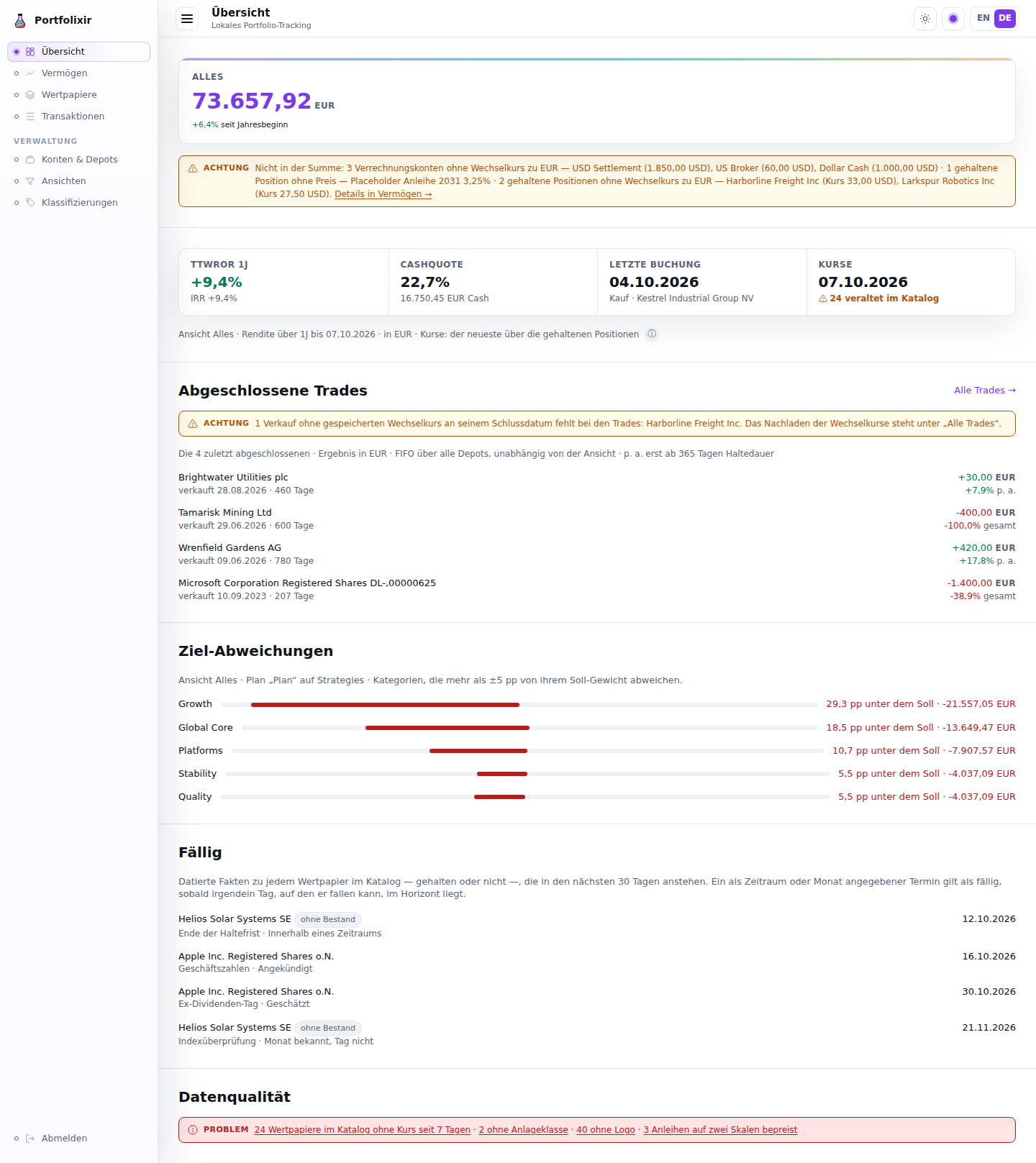
The Overview on the synthetic demo dataset, in the German interface. Every
screenshot in this handbook comes from that dataset (priv/demo), never from
a real instance.
Wealth Page
The Wealth entry in the navigation opens the wealth overview, organised
into tabs (ADR-0022): Holdings (value, performance, positions, data
quality, cash),
Allocation & targets (the sunburst and drift table), and Cash flow
(the received dividends and interest report). The Holdings tab opens with
the key-figure band in two tiers (issue #797): three lead figures at
full size — the total value including cash with its securities/cash
composition, the TTWROR with the period’s absolute result, and the
money-weighted IRR with its basis line — over four supporting figures
at half height: the securities value, the cash quote with the cash amount,
the opening value with the net flows, and the wealth multiple. The currency
is a small suffix after the digits, so no value wraps. The return figures
cover a selectable period (year-to-date, one/three/five years, or since the
first transaction; one year is the default) with the cumulative performance
chart. The Allocation & targets tab does not repeat the band: it carries one
summary line — total, cash quote, TTWROR — with a link back to Holdings.
Among the supporting figures sit the invested capital —
always two labeled numbers, the value at the period start and the net
external flows (deposits minus withdrawals, deliveries at transaction
value), never one merged figure — and the wealth multiple: end value ÷
invested capital, the honest “what the money put in has become”. When net
invested capital is zero or negative the multiple reads n/a — never a
negative multiple. For windows shorter than a year the money-weighted KPI
is labeled MWR and shows the period figure instead of an annualized
one, which would explode a short window (ADR-0034).
Positions (issue #814) lists the holdings projection this instance
serves over the API — one row per depot and security, valued at the latest
stored price, as the line under the heading says — with a Columns
picker over that projection’s own fields: beyond the default depot,
security and quantity it offers ISIN, WKN,
currency, average cost, latest price, market value and the unrealised result
in money and percent. The rows follow the page’s scope, as every figure on
the page does (issue #1124): under Everything they are the holdings of
every portfolio, under a view the positions that view holds, so a holding
the totals and the notes count is a row here. These are the same fields an agent selects with the
holdings API’s fields= sparse fieldset, read from the same projection, so
a figure here is the figure there — with your locale’s separators, and with
the row’s currency after every money figure, so a market value states its
currency even when the Currency column is switched off. The choice is stored
in the browser and survives a reload; clearing every box falls back to the
defaults rather than leaving a table with no columns. The picker sits above
the table, and appears only when there is a table to configure. On a phone
(under 560 px) the positions read as two-line rows instead of the table:
the security’s name over its depot, the quantity on the right (“18 units”),
so nothing has to be swiped sideways; the rows show the default fields, and
the Columns picker is hidden there because it would change nothing. When
two different securities carry the same name — a duplicate awaiting a
merge, for instance — each row shows what tells them apart after the name,
in a smaller muted font: the ISIN where both have one and they differ, else
the WKN on the same terms, else the record’s number (“no. 42”). This holds
in one depot or across two, because two depots’ names can read alike and
the Depot column can be switched off. A name that occurs only once stays
bare, and so does one security held in two depots.
Beside the fixed buttons, a year dropdown chains any single calendar year
with data, and a from/to date range chains a custom span — both are pure
re-chains of the already-computed series, clamped honestly to the available
history (a backwards range is refused with a short note). On the
Allocation & targets tab, the allocation sunburst
shows the classification as concentric rings — the inner ring is the top-level
categories, each outer ring breaks one level down with sub-category arcs nested
inside their parent, and the outermost ring shows the individual positions
as shaded arcs of their category’s colour (the Portfolio Performance style) —
with a grey slice for unassigned holdings. Categories without a chosen
colour are assigned distinct palette colours automatically, so an unstyled
tree stays readable. Like PP the slices carry no
in-chart text: the chart’s centre carries the reference value (the
allocated total) or, on hover or tap, the touched slice’s name, value and
actual share against its target — the touch device’s tooltip — while a
pointer also gets an instant custom tooltip that follows it (no browser
hover delay). The legend shows each share’s value next to its percentage,
and the chart’s basis line names the plan, the top-level Σ of its targets,
the view and the as-of date. With JavaScript disabled the slices fall back
to the native browser tooltip. The chart scales to the available width. Pick
any classification tree from the selector. The drift table beneath it sits
behind the Data as table disclosure every chart carries and lists every category in tree
order with sub-categories indented under their parent, comparing the
rolled-up actual weight against the stored target and restating the drift in
the base currency. The tree starts collapsed at the
top level; every row with children carries a toggle (▸) — the whole
category-name cell is clickable — that reveals its direct children —
subcategories and positions alike (the grey Unassigned bucket expands the
same way into its member securities) — and a single Expand all / Collapse
all toggle above the table opens or folds the whole tree down to the single
position. Beside it sit the drift-threshold chips — Deviating by ≥ 1 pp
/ ≥ 2 pp / ≥ 5 pp: picking one narrows the table to the categories that
actually deviate by at least that much, in either direction, and clicking the
active chip clears it again. Three things are worth knowing. The 5 pp step is
the same threshold the dashboard’s attention list uses, so the alerts and this
table agree on what needs attention. A filtered table is flat — a kept
category shows even when its parent is under the threshold and therefore gone
— and it always keeps the Cash and Unassigned rows, which the line above
the table states along with how many of how many categories are showing.
Finally, the threshold rides the URL (?drift=5), so a bookmarked or shared
link reopens the same filtered view; it is the same filter the API and MCP
offer as min_drift= (a weight fraction there: 5 pp is min_drift=0.05).
What the pp is measured against matters when a plan deliberately does not sum
to 100 %: the chips use the same drift as the Drift column and the
dashboard’s attention list, which under ADR-0040 is measured against the plan
renormalised to the allocated portion — not against the raw Target column. So
with a plan summing to 83 %, a category at 21.2 % actual against a stored 55 %
target is 45 pp off, not 34, and the chips, the Drift column, the dashboard
and min_drift= all agree on that number. The basis line says so where the
figure is read: behind the plan’s top-level Σ it adds “— drift against the
allocated portion” whenever the plan allocates less than 100 %, and it shows
that Σ in the warning colour only when the plan allocates more than 100 %
— a plan with a deliberate remainder is not a mistake (issue #875). The Drift
column’s ⓘ says it too and works one figure through: in a plan allocating
80 %, a 40 % target counts as 50 % (issue #911).
A Tree | Positions switch — a segmented control whose active option is
filled — swaps the hierarchy for a flat
rebalancing worklist: one row per security (cash included) with its category
as context, sorted by signed drift by default (most overweight first, most
underweight last) and re-sortable via the column heads (value, drift, or
category). Each row’s drift carries its rebalancing hint beneath it, in one
cell that stays pinned at the right edge of the table when the list scrolls
sideways on a narrow screen (issue #911). The cash row’s category reads “—”:
cash has its own target and is never “Unassigned”. A category with directly assigned securities expands into its member securities, each with its value,
weight, its share of the category drift, and a display-only rebalancing
hint: the indicative number of units to sell (positive drift) or buy
(negative) at the valuation’s price to close the gap (ADR-0023). A hint that
rounds to zero units at two decimals is not shown; the drift stays. The hint
models no fees or taxes, and there is deliberately no order button behind it —
acting on it stays entirely manual.
Position targets show in the plan (ADR-0030 slice 2a). When the active plan carries per-position SOLL weights, each such position row shows its own target and its own drift (actual weight minus its target), and a position with a SOLL set but no holdings yet still appears — with IST 0, a not held marker (inside a named view it reads not held in this view, since the view says nothing about the whole depot), the full underweight drift, and a buy hint priced at the latest stored quote — the hint’s tooltip names the quote date it is priced at. Without any quote a no quote chip explains the missing unit hint (add a price to get one). “Held” means the position is held at all: a held security whose price cannot be determined keeps its data-quality hints and is never re-labelled not held. A position row is hidden only when its SOLL is 0 or absent and its holdings are zero. The category’s Target column then shows the effective target — the sum of its position targets (positions are the source of truth); if the stored category weight disagrees, or a position target has gone stale (its security was moved or unassigned), a data note above the table states it and names the categories (issue #719 — findings render as notes, never as pills inside data cells; a conflict at problem severity, a stale target at attention), and the affected position row itself carries a stale target chip. A held-but-unassigned security with a (stale) position target shows that target on its row in the Unassigned bucket too. When no top-level category carries a target but deeper categories do, the Σ header adds the deeper targets’ sum (“targets deeper in the tree”) instead of showing a bare 0%. The cash section lists each account’s balance read-only and links to Accounts & depots, where each cash-account row shows its balance with the date of its last booking (last booking 2026-03-31: the balance is today’s, the date is when a booking last moved it, #1085) and opens a small Set balance dialog with the account already chosen: enter the balance the bank shows and the snapshot is recorded without booking individual transactions.
The page scopes to a view (ADR-0024). The header totals and the cash
section follow the active view across all portfolios — Everything
(German Alles) is the built-in default and shows every holding, each account
counted exactly once. Pick a view in the view switcher at the top of the
page — its Views link (issue #720: renamed from “Manage…”, ellipsis
dropped because it navigates rather than opening a dialog) opens the Views
page where views and their buckets are edited. That page reads list-first:
each view’s row says what it does (its include/exclude buckets as chips) and
what it covers (the scoped total, positions and accounts), with the built-in
Everything row marked as the default; each bucket’s row carries its
colour and where it is used (the accounts it is the default on, the
positions inheriting it, the positions tagged directly). Row actions sit in
the row menu, the create forms open from +, the two-step explanation is
the ⓘ on each heading, and default buckets are set on the account row of
Accounts & depots, which the buckets section’s basis line links to.
Set as default (Als Standard festlegen) remembers the choice
server-side, so the Wealth page and the Overview page open on that view
whenever no other view has been explicitly picked (an explicit pick — including
Everything — always wins). A view, a benchmark or a language that arrives in a
link from another site applies to the page that link opens and is not
remembered (E25): only a choice made on the instance itself, or typed into the
address bar, changes what the next page shows. That page’s own links (the
language switch, the tabs) do not pass the foreign view on, and a login in
between drops the view, benchmark and language from the address it returns
to. When the active view’s buckets share an account, a
badge next to the total — Overlapping buckets — accounts counted once —
states that per-bucket figures overlap and must not be summed; the total
itself is already deduplicated. View-scoped performance series carry the label
Composition as of today (Zusammensetzung per heute): the view’s current
bucket membership applies retroactively to the whole history, and bucket
changes are recorded in the audit journal. After the one-time ADR-0024
migration that turned each portfolio into a bucket and a view of the same
name, the page shows a dismissible notice listing the seeded views; the
dismissal is remembered. (Migrated an empty database and restored data
afterwards? Run mix portfolixir.seed_scope_buckets once to seed the
missing bucket/view pairs — it is idempotent.) The default view is also readable and settable over
the API (GET/PUT /api/v1/settings/default_view) and the MCP tools
portfolixir.settings.get_default_view / set_default_view. Worked
click-by-click setups (household split, strategy views, PP-migration habits)
are in the Buckets & Views Guide.
The target side follows the active view (ADR-0020). The drift table’s Target, Drift and Σ target top level columns reflect the active view’s plan for the selected classification — actual and target always move together. Switch the view switcher at the top of the page and both sides swap to that view’s plan at once, so two plans are never mixed into a >100% Σ or a ghost row. The built-in Everything view (formerly labelled Total) reads the portfolio-wide plan, the one with no view. A subtle dot on a view-switcher chip marks the views that already carry a plan for the current classification, so steered views and actual-only ones are distinguishable at a glance.
No plan for the active view? When the active view has no plan for the
selected classification, the allocation stays actual-only: the sunburst and the
Value/Actual columns still show the actual allocation, but there are no Target,
Drift or Σ columns. In their place a hint — No target plan for this view
(German Kein Soll-Plan für diese Ansicht) — explains the empty target side and
deep-links into the Classifications plan editor with that view and
classification already selected (/classifications/<id>?view=<view>, the
view switcher’s own parameter), so the plan can be created without re-picking
either. The cash row’s target likewise comes from the active view’s plan cash
target (or shows a dash when none is set).
The page paints immediately and computes its figures asynchronously; each
section fills in when its data is ready. The expensive daily performance walk
runs once and is cached on the page — switching the period re-chains the
cached series, so the period control responds instantly. The period tokens
(YTD, 1Y, 3Y, 5Y, Max) and the %/value series toggle render as segmented
controls; a from/to custom range (ISO dates, YYYY-MM-DD) and the walked
calendar years sit behind the Custom range… control next to them. Opening
it shows a small popover on the control itself (issue #801): the from/to pair
on one row, one chip per year with data, Cancel and Apply — the
section heading and the chart stay where they are. A year chip applies on
click; Esc or Cancel closes the popover and returns focus to the control. The
range pair is labelled and validates as a range (issue #721): a backwards or
unparsable entry is refused with the message on the field that can fix it,
and the popover stays open until it is corrected; an applied range or year
closes it and shows itself as an active chip carrying the resolved dates (or
the year) in the period control — the control always answers “what am I
looking at”. The security detail chart’s custom range behaves the same way.
The chart is
downsampled to a bounded number of points, so a decade of daily history stays
light in the browser. The chart’s Data as table disclosure holds
insight-level summary rows — one per year, or per month for periods up to a
year — with the start and end value, the slice’s own TTWROR and its net
external flows, instead of a daily dump. Money and percentages follow the chosen language
(German 1.234.567,89, English 1,234,567.89; money always with two
decimals).
A data-quality panel appears above the chart when something would otherwise silently skew the figures: positions valued at their last trade price because no quote exists yet, positions with no price at all (excluded from the totals, listed by name), positions whose price is known but that lack an exchange rate to the base currency (excluded from the totals; listed with their native price, showing what a rate sync would bring in), securities whose derived holding quantity is negative — impossible for a real holding, usually import debris from an unmodeled corporate action — listed per depot with the security’s total across all depots and linked to the security’s transactions so the history can be repaired (nothing is repaired automatically; the split wizard remains the only guided repair), bookings with implausible dates (before 1970) that were applied on the first plausible day instead, and bonds priced on two scales — quotes near 100 beside booked unit prices near 1, so they count a hundred times too high, each linked to its transactions; and, in a note of their own, quotes near 1 beside booked unit prices near 100, so they count a hundred times too low, each linked to its quotes (see Bonds under Securities); and positions whose quotes do not match their own bookings — the quote of a booking’s day below half or above twice its price per unit — each named with that booking and the quote of its day, “Wrenfield Gardens AG (buy 2026-05-12 at 48.2 EUR · quote 2026-05-12: 4.87 EUR, 0.10 times that)”, and linked to its quotes (see A quote that does not match the bookings under Quotes and Charts). A bond named there without an asset class — brought under the guard by its maturity or coupon — is marked no asset class. Each finding is a note at its own severity — a hint for the trade-price fallback, attention for excluded and stale positions, a problem for negative holdings, for two scales and for quotes that do not match their bookings — and carries its remedy inside the note: the Sync exchange rates control sits in the missing-rate finding, and a cash account left out for want of a rate is named with its balance in its own currency — “USD Settlement (1,850.00 USD)” — and also marked no exchange rate in the cash table. Negative-quantity positions are also marked with a “negative quantity” chip wherever they appear: in the allocation table, in the classification tree and on the security’s holdings tab.
Performance (TTWROR)
Portfolixir reports the true time-weighted rate of return the way Portfolio Performance does: the portfolio is valued every day from the first transaction onward, money put in or taken out (deposits, removals, deliveries, and balance-snapshot jumps) is neutralised, and the daily returns are chained. The result measures how well the investments performed, regardless of when cash moved — dividends, interest, fees and taxes count as part of the return.
Holdings without quote history are valued at their own last trade price (the same fallback the data-quality panel lists). Such a position sits flat between trades, and the day a new trade sets a different price the whole previously-held quantity would re-price in one step. That step is a change of valuation basis, not a market move, so it is neutralised the same way a deposit is and does not enter the return — otherwise those steps compound into a percentage no market ever produced. What still counts: selling. A sale turns the position into real cash, so its gain against the price the position was carried at stays in the return and is never swallowed. Everything else the day re-prices — the quantity still held, the quantity bought, the quantity delivered out — is basis. This applies to a position with no quote at all. Once a quote has landed the position is measured: later gaps in the feed are just gaps, and the trades filling them count as return again. The first quote for a previously unquoted position is itself a basis step, not a one-day jump — loading history that only covers recent dates would otherwise report years of accumulated drift as a single day of return. Value, net external flows and the € gain beside the percentage are unaffected — they keep reporting the money as booked, so a trade-price-valued portfolio can show a substantial € gain next to a near-zero TTWROR.
Next to it Portfolixir shows the money-weighted return (IRR) — the single
annualised rate that discounts the period’s dated deposits, withdrawals and the
terminal value back to zero, the figure Portfolio Performance shows beside
TTWROR. Where TTWROR ignores the timing of cash flows, the IRR reflects it, so
the two read differently when money moved at good or bad moments. The IRR shows
— when there is no rate to compute (no flows of both signs, or the solver does
not converge).
Because a max-period TTWROR in the thousands is not a wealth multiple (it
says what one unit from day one would have become, not what the actual money
did), the same summary also carries the money-weighted companions
(ADR-0034): invested
capital (period opening value plus net external flows), the wealth
multiple (end value ÷ invested capital; n/a at zero or negative net
invested — never a negative multiple) and the period MWR, the
non-annualized form of the IRR that short windows display. Exactly four
transaction kinds count as external flows — deposit, removal, inbound and
outbound delivery (at full transaction value) — plus the balance
adjustment’s jump; everything else (dividends, interest, fees, taxes,
buys/sells, internal transfers) is performance, not flow. Multi-currency
flows convert at the flow date’s stored rate through the EUR hub, so the
result is the EUR-investor’s return including currency effects. The API
response and both performance MCP tools expose invested_capital,
wealth_multiple and mwr as Decimal strings alongside ttwror and
irr.
Performance is shown on the Wealth page and available per period —
year-to-date, one, three, or five years, since the first transaction, a
single calendar year (year=YYYY), or a custom from/to date range —
over the API
(GET /api/v1/portfolios/:id/performance) and the
portfolixir.portfolios.performance MCP tool, optionally with the full daily
valuation series for charting. The method and its trade-offs are recorded in
ADR-0010.
While a series recomputes
The daily performance series is remembered between page loads and recomputed when data changes (a booking, a quote, an exchange rate). While that recomputation runs, the page shows the last computed series instead of a loading skeleton — always labelled with exactly what it contains: how many bookings, through which date, computed when, as of which day. The label is the contract: a superseded number never appears without it, the swap to the fresh series happens in one update, and if the recomputation fails the label becomes an error instead of letting the old number stand. The overview page’s wealth card serves its last known “year to date” figure the same way. (ADR-0032.)
Benchmark comparison
(ADR-0046, FR-9) — was the
effort worth it? Under Benchmark… in the performance section, pick up
to two benchmarks: a security marked as a benchmark on the Securities page
(an index proxied by an ETF, gold by an ETC, quoted through the ordinary
sync) or a fixed annual rate typed as a percentage (the savings-account
alternative; in this version also how inflation is expressed). The choice
rides in the URL and is remembered like the active view; a rate is kept
only when the comparison can use it exactly (between −99.9999 % and 1000 %
p.a., with at most 15 decimal places as a fraction), and a remembered rate
that no longer meets that is dropped on the next visit. Two comparisons
appear, both the ones Portfolio Performance shows. Bought once — the
benchmark rebased to the period start, drawn as a dashed overlay on the
TTWROR chart with its own legend and in the chart tooltip — answers whether
the selection beat the index. Savings plan — the period’s opening value
and every deposit or withdrawal invested into the benchmark on the same day
at that day’s price, without fees or taxes — gives an end value; the
comparison block next to TTWROR/IRR shows the real end value minus it as the
figure, beside the bought-once pair and the two IRRs on identical flows. A
flow dated before the benchmark’s first quote is left out and the block
names the covered window. The synthetic portfolio is frictionless, which
biases the comparison against the real portfolio — the conservative
direction. Nothing is stored: both comparisons are derived on read, per
period and per view, and available over the API
(…/performance/benchmark) and the MCP tools
portfolixir.portfolios.benchmark and portfolixir.views.benchmark.
Contribution by position
Directly under the performance chart on Wealth → Holdings, a table answers which position made how much of the period’s result (ADR-0051, FR-41). It follows the section’s period control and the page’s view, like the badge above it. Per position, in the base currency and with the currency move included, the contribution is end value − start value − flows + income − costs: the value at the end of the period, minus the value at the close of the day before it, minus what was bought and plus what was sold (each at its booking day’s rate), plus the dividends as credited, minus the fees and taxes of the position’s own trades. A cross-currency trade’s fees and taxes count in its cash account’s currency, the currency the broker charges them in. Each row shows those five figures beside the contribution, so every number can be checked by hand; the rows are sorted by contribution, largest first, and a bar under each figure shows its size against the largest. A position held for only part of the period has its row too, with a marker under its name: “not held at the start” when it was bought during the period, “no longer held at the end” when it was sold during it, and “held at neither end” when it was bought and sold inside the period.
What no position owns is listed apart, under “Not attributed to a position”: interest, standalone fees and taxes, and the currency effect on cash (the revaluation of foreign-currency balances and the settlement differences of buys and sells). Each line is summed from its own bookings, and none is a balancing figure. The positions and those three lines add up exactly to the period’s money result, so the sum row equals the money figure in the badge (“+x EUR in the period”) beside the TTWROR. Deposits and removals are no result and appear nowhere.
With more than ten positions, the table shows the ten largest by absolute amount and a Show all N control; the sum row always covers every position. A position that counted zero on some days of the period, because no price or no exchange rate was stored, keeps its place in the table and in the sum, carries the number of those days on its row, and is named in a note under the table. A period with nothing in it shows a sentence instead of a table of zeros, and on a phone the table becomes two-line rows. There a row’s flow names its side — “inflow into the position 2,000.00”, “outflow from the position 1,420.00” — because the flow is the position’s own: money paid into it by buying, or taken out of it by selling, not money leaving the portfolio. Two different securities with the same name each show what tells them apart after the name, in the table and in the phone rows: the ISIN where both have one and they differ, else the WKN on the same terms, else the record’s number (“no. 42”), as on the Positions table. The table has one row per security, whichever depot holds it, so such securities are told apart here even when they sit in different depots; and the check covers every position, the ones behind Show all N included.
A cash account in a foreign currency counts zero, too, on every day it holds money while its currency has no stored exchange rate to the base currency. The day the first rate arrives, its whole balance enters the period’s result and the currency effect on cash at once: money that became visible, not a currency gain (for an overdraft, not a currency loss). The note under the table names such an account the way it names a position — its balance in its own currency, the days it counted zero (the day before the period, whose close is the start value, included) and the reason — and, when the first rate arrived inside the period while the account still held money, says on which day the balance entered the currency effect; that line carries the account’s marker (“Tagesgeld CHF: 18 days at zero”). An account still without a rate on the period’s last day is said to count zero until the end of the period. Pick a period that starts after the first rate’s day and the account, like the jump, is gone from the table and the note. Since the historical rates arrive by themselves (see Exchange Rates and Valuation), such an account is left only where they could not: a currency the ECB does not publish, money held before 1999, or an instance that has not fetched them yet (no network, background fetches off).
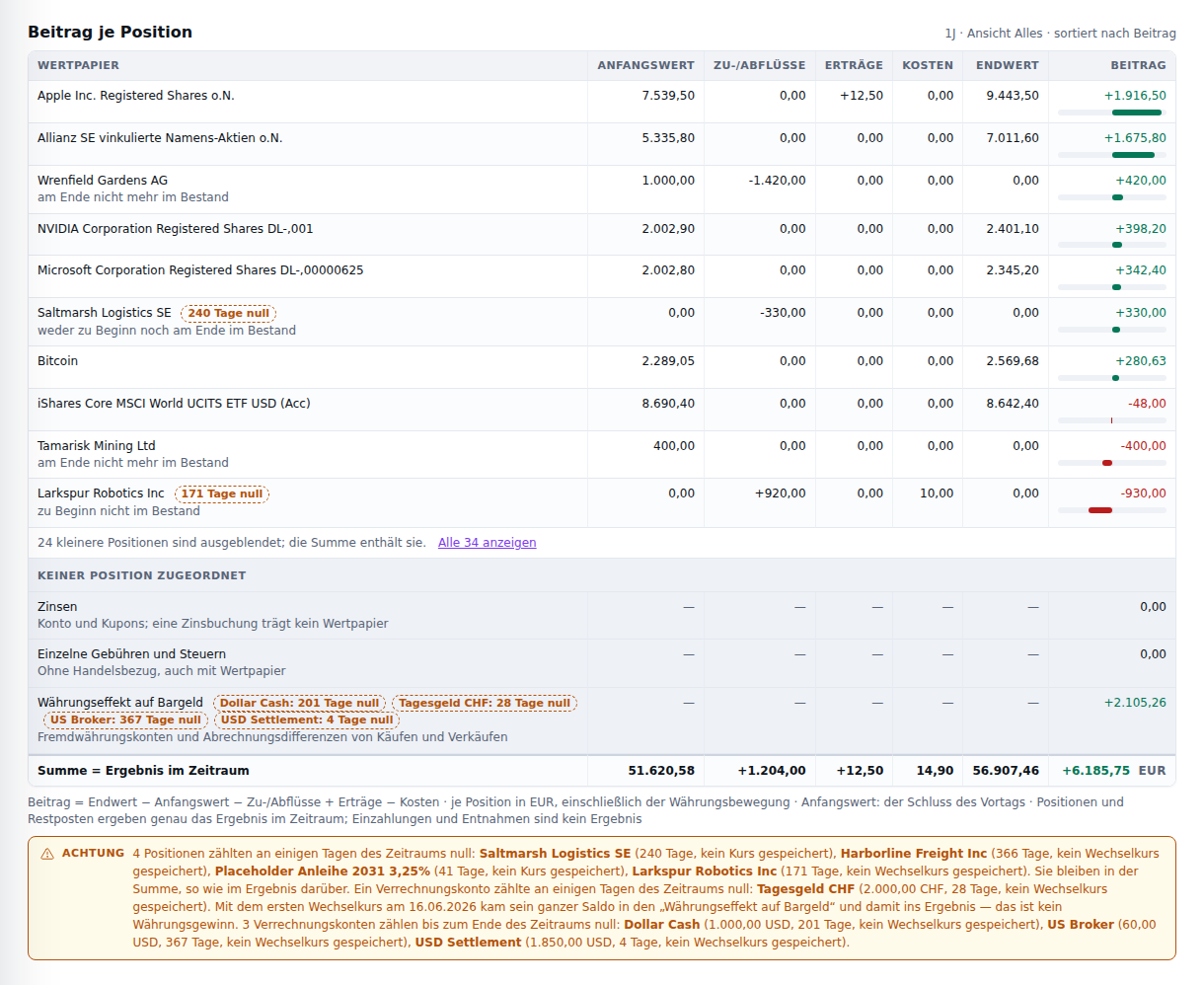
Contribution by position on the synthetic demo dataset, in the German interface.
Cash flow
The Cash flow area (/cashflow) is where money movements are read
retrospectively. It exists as an area rather than a single “income” page
because three of the analyses that belong here are not income at all —
realized gains from sales, deposits and withdrawals, and costs — and putting
them under one label reproduces exactly the ambiguity this app was built to
avoid. Each analysis is its own named facet, and a facet appears only once its
data exists; nothing renders as an empty shell. Income is the default
facet, and /income still resolves — it redirects here, so older links
and bookmarks keep working. Since issue #724 the area carries a second-level
facet switcher.
Trades (/cashflow?tab=realized, issues #724, #807 and #984) answers
“what did selling actually make — and was the trade worth it”. Since issue
#807 it is the Trades view, and since issue #984 its switch says so (the
address is unchanged, so links and bookmarks hold). Since issue #1082 the
top bar is titled Trades while the facet is open — on a phone, where the
subtitle is hidden, too — and reads Cash flow on the other three facets.
The facet opens with
three figures — the realised total, signed and in its gain or loss colour,
the hit
rate (the share of closed trades that realised a gain; a break-even trade
counts as a miss) and the average holding period — followed by the closed
round-trips themselves, newest close first, each row naming the security
(linked to its Trades tab), bought → sold, how long it was held, the quantity,
the cost, the proceeds, the p. a. column and the result in both money
and percent. Every result, percent and p. a. figure in the list, on the
table and on its phone rows, carries its sign as well as its colour — a gain
reads “+420.00 EUR”, “+42.0%”, “+17.8%” — so a gain does not depend on
telling green from red (issue #1089); a figure that reads zero (“0.00”,
“0.0%”) carries neither. p. a. (issue #984) is
the trade’s annualized return: the money-weighted return per year of the
trade’s own money — each bought lot at the date it was bought, the sale at
the date it was sold — in the trade’s own currency, like the percent under
the result. It appears from 365 days of holding (the Holding period
cell of the same row); below that the cell is a muted dash whose reason is
its tooltip (“Not annualized under one year of holding”), because a short
trade annualized reads absurdly — 5 % in 14 days would be about 257 % a
year — and its percent over the holding period already says what it made.
A line under the list states the rules: deliveries open no lot, fees and
taxes are in the cost and the proceeds, income received while a trade was
open is not included, and p. a. only from 365 days of holding and only where
a rate solves the flows. The
matcher’s scope — FIFO per security across all depots — is in the facet’s
opening line. On a phone the table gives way to two-line rows: the name
over bought → sold and the days, the result over its percent and, from a
year of holding, the p. a. figure; a trade without one — held under a year,
or a total loss no rate solves — ends its percent in total
(“-38.9% total”), the word the Overview card uses. A trade on no cost has
no return (issue #1142): bonus shares booked as a buy at 0 and sold later
made “+330.00 EUR” on nothing, and a percentage of nothing is not 0 % but
undefined. Its percent is the muted dash with the reason “No return: no cost
basis” as its tooltip, its p. a. dash names the same reason before any
other, and on a phone the row, like the Overview card, reads “— no cost
basis” where the percent stood. The year × month matrix the facet used to open with
keeps every number, now under Realized per period behind a Year and
month matrix disclosure beneath the list. Where a sale could not be
converted, the note saying how many and which leads the section — above the
three figures it qualifies, with its backfill control — rather than sitting
under the numbers it is about.
With no closed trades the hit rate and the average holding period read as
absent rather than as 0 % and 0 days — the average of nothing is not zero.
All three figures are derived from FIFO-matched realized P&L across all
securities, grouped by each sale’s close date. The FX
basis is stated on the surface and travels in the API payload (decision D-1):
each sale converts through the EUR hub at the rate stored on its own close
date, because a realized figure is a historical fact tied to its date. A
sale with no stored rate for that day is excluded from every total and
named in an attention note (count and securities) — never converted at a
neighbouring date’s rate, never silently dropped. The daily rate sync fetches
current rates and cannot fill a past date, so the note carries the remedy
that can: Backfill historical rates fetches the historical ECB series
once, stores every published day, and re-reads the facet — the excluded sale
converts at its own close-date rate the moment that date has one (issue
#737). The limit that remains is stated next to the control: a day the ECB
did not publish (a weekend, a currency it does not list) stays excluded and
named. The same backfill is scope=history on the exchange-rate sync
endpoint and MCP tool; the deposits-and-withdrawals and costs facets carry
the same control in their exclusion notes.
A trade across currencies is in one currency (issue #1108, the ADR-0015 amendment of 2026-10-07). A USD security bought and sold through a EUR account has its price in dollars and its fees and taxes in euros, the currency of the cash they were charged to. Before they enter the cost and the proceeds they are converted into dollars at the trade’s own rate — the one its settlement records, the rate the broker applied to that trade — never at the day’s hub rate, which would convert the same euros a second, different time. So the cost, the proceeds and the result of such a trade are all in dollars, and its result in euros is the cash the round trip moved whenever the broker’s rate and the hub’s agree: 10 shares bought at 100 USD for 800.00 EUR plus 6.00 EUR in fees and taxes, and sold at 120 USD for 960.00 EUR less 3.00 EUR in fees, cost 1,007.50 USD, bring 1,196.25 USD and realise 188.75 USD — 151.00 EUR, the 957.00 EUR received less the 806.00 EUR paid. A trade imported from Portfolio Performance is booked in the account’s currency, its fees with it, and needs no conversion.
Sells with no matched buy are named too (issue #984). The matcher pairs each sell with earlier buys of the same security, first in, first out, in one queue across every depot, and an inbound delivery opens no lot — so selling shares that arrived by a delivery, typical of an imported history, leaves a sell with nothing to pair, and a sell larger than the shares bought leaves its remainder. That unmatched quantity is no closed trade and is in none of the three figures, the list or the matrix; the matched part of the same sell is a trade like any other. An attention note after the currency note says how many sells have such a quantity, and its disclosure lists each as security · date · unmatched quantity (“1.0000 unit”, “15.0000 units”). It carries no control, because nothing on the page can supply the missing buy.
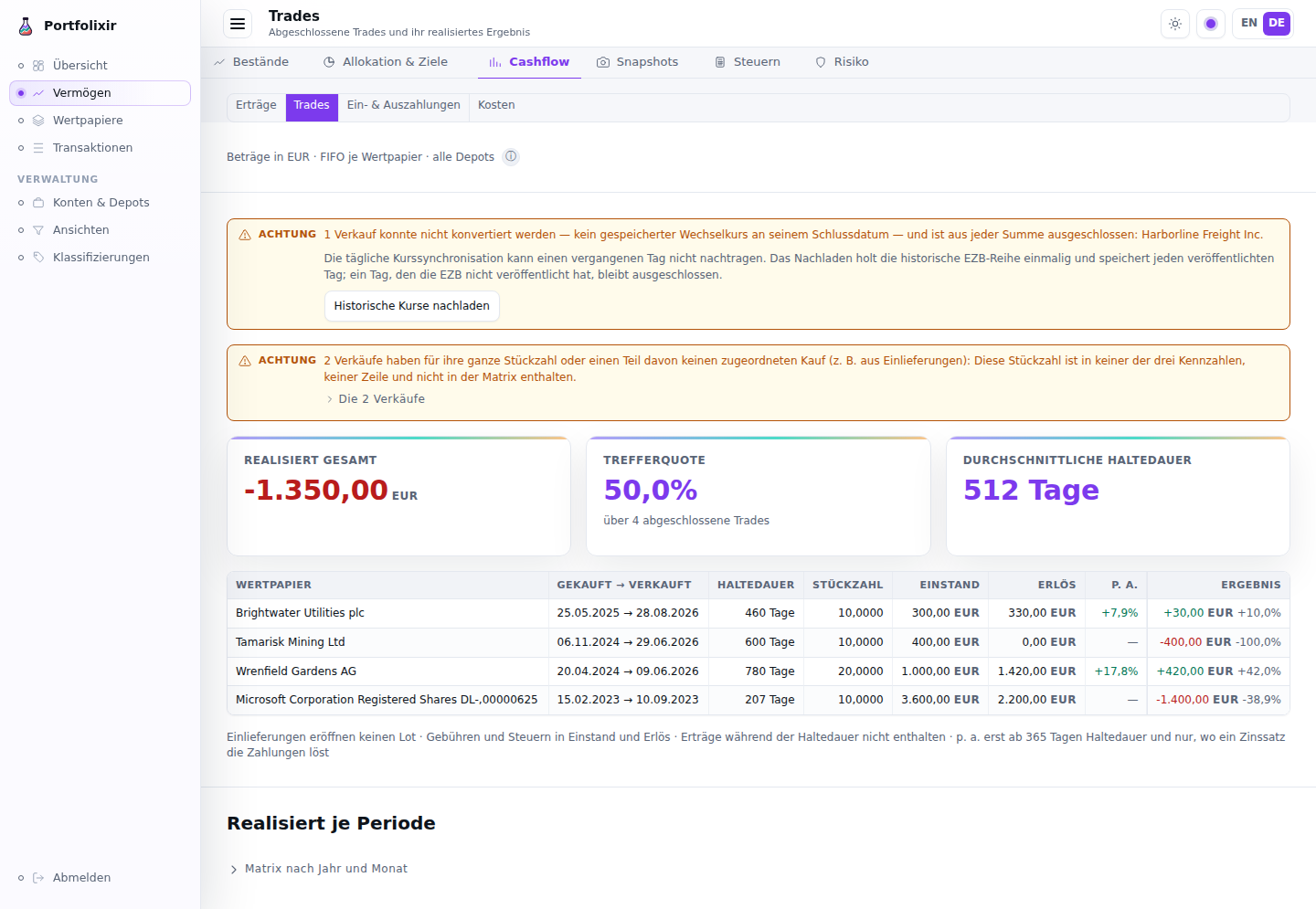
Cash flow → Trades on the synthetic demo dataset, in the German interface.
The security’s own Trades tab (issue #1029) is where every row of the facet and of the Overview card leads, and since Sprint 18 it shows the same figure: its Closed trades (FIFO) table carries the p. a. column between Days and Realised P&L — the trade’s annualized return, signed, from 365 days of holding, and below that the same muted dash with its reason as a tooltip. A trade held longer whose flows no rate solves (a total loss) carries the dash too, with that reason. Sells of delivered-in shares are named at the head of the section in the same attention note, with each sell as date · unmatched quantity — the security is the page’s own — instead of the former “may indicate missing data” warning; when such sells are all there is, the note stands alone, without a table. A line under the list states the rules: across every depot, deliveries open no lot, fees and taxes are in the realised P&L but not in the average buy and sell prices, income received while a trade was open is not included, and p. a. only from 365 days of holding and only where a rate solves the flows. The realised P&L and its fees and taxes are in the trade’s currency, a trade across currencies converting them at its own rate, as on the facet (issue #1108). An open lot or a closed trade on no cost shows the dash with “No return: no cost basis” in its “%” column, and so do the security’s Holdings tab and Wealth’s optional P&L % column for shares delivered in at no cost, such as a spin-off (issue #1142); a holding with no price keeps the plain dash. On a phone the table gives way to two-line rows: opened → closed over the quantity and the days, the result over its percent and, from a year of holding, the p. a. figure. Since issue #1060 the tab’s dates — of the open lots, the closed trades, the unmatched sells and the phone rows — are in the interface language’s form (14.03.2024 in German), and both % columns read one decimal with their sign and the percent sign glued on (“+27.1%”), like the p. a. column beside them. On a touch screen the ⓘ Price & currency return pill above the open lots shows its whole label (issue #1059).
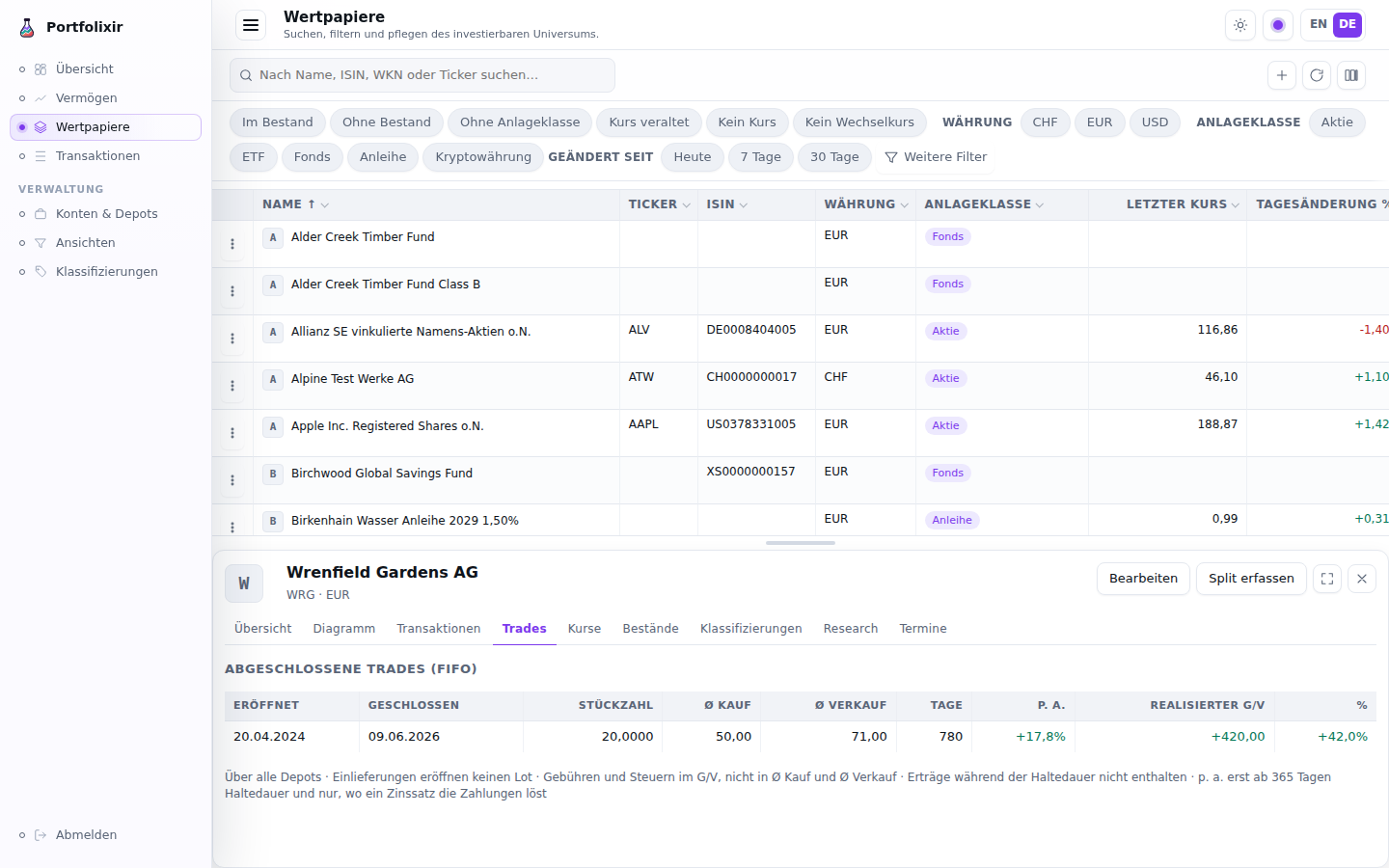
A security’s Trades tab on the synthetic demo dataset, in the German interface.
Deposits & withdrawals (/cashflow?tab=flows, issue #725) is the
owner’s “Ersparnis”: what was put in and taken out, per period, as two
series with a yearly net — separate from what the portfolio earned. It
counts the booked deposits and removals only, and says so: securities
delivered in or out and balance-snapshot jumps are not in this number, while
the performance’s invested-capital figure does count them — the surface
states that difference instead of leaving two disagreeing figures to be
discovered. Same FX basis and the same excluded-and-named rule as the
sibling facets, with unconvertible flows named by their cash account. A
flow is read in the currency of the cash account it was booked to: a deposit
booked in dollars into a EUR account, its rate stored, is the euros that
arrived (issue #1107).
Costs (/cashflow?tab=costs, issue #726) is what the portfolio cost to
run: fees and taxes per period, as two series with a yearly total — at
overview level only, deliberately not a per-transaction cost ledger. It
sums the fee and tax legs riding any transaction plus the standalone fee
and tax bookings, and nets tax refunds against taxes; it never sums gross
amounts, whose fee-inclusiveness differs between buys (inclusive) and sells
(net) — the surface states that rule in its composition line. Same FX basis
and the same excluded-and-named rule as the sibling facets. Each fee and tax
is read in the currency of the cash account it was charged to — euros for a
USD security bought through a EUR account — and converted from it at the
rate of its booking date, as the performance’s trade costs are, so the two
read one figure (issue #1107); an unconvertible cost is named by that
currency.
Every figure on the area says what it contains: the Income facet states that it covers dividends and interest and that it excludes realized gains, deposits and withdrawals, and costs. That is not decoration — those omissions are the reason the other facets exist, and a reader who does not know them reads the page as “all the money that came in”.
Income (dividends and interest)
The Income facet is the retrospective income report: the dividends and interest already booked in the ledger, with no external data or forecast. It shows an annual overview — a year × month matrix split into a Dividends and an Interest series, each year with a totals column — and a per-position table with, for each security, the gross paid, the withheld tax, the net, the number of payments and the date of the last one. A dividend’s gross is the net cash credited plus the withheld tax recorded on the transaction; interest (Portfolio Performance INTEREST: account interest or bond coupons) carries no withholding and is tracked as its own series next to dividends. Clicking a year opens the per-transaction detail for that year.
The year bars above the matrix are stacked, not summed: dividends and interest are two segments, so the chart and the table can never disagree about what the number is. A legend names the two series and a segment tall enough carries its value as text; every year between the first and the last booking has its slot, an empty one drawn as a baseline tick with “–”; zero cells in the matrix read as a quiet “–” so the non-zero cells are what the eye finds; and both the matrix and a drilled year’s payments sit behind the Data as table disclosure every chart carries. Drilling a year adds an accumulated series across its months — the running total, so a quiet month reads as a plateau rather than as a gap, and the shape answers “where did the year stand by April” instead of “what came in in April”.
Amounts are reported in the portfolio’s base currency; the original currency
stays visible on each row. A payment is read in the currency of the account
it was credited to: a USD security’s dividend credited to a EUR account is
the euros that arrived, and its row among the year’s payments names EUR,
while the per-position table keeps the booking’s currency (the ADR-0015
amendment of 2026-10-07). The conversion methodology (EUR hub at each booking
date’s stored rate — the same conversion the valuation uses) sits behind the
ⓘ affordance next to the currency line. The report is also
available over the API (GET /api/v1/portfolios/:id/income) and the
portfolixir.portfolios.income MCP tool.
Snapshots (what if I had kept it?)
The Snapshots tab of the Wealth area freezes “the holdings I have right now” as a named marker and later answers: would I have done better keeping exactly those holdings? Create a snapshot before restructuring a strategy, trade on, and come back to compare.
A snapshot is a pure ledger marker — a name, a scope (a bucket view or Everything) and an as-of date. It copies no transactions, quantities or prices: the state it represents is derived from the transaction ledger on demand, so a snapshot can never drift from the data, and deleting one never touches a transaction. Names are unique per scope and the as-of date cannot lie in the future.
The comparison is the surface. With at least one snapshot the page opens
on the newest one’s comparison; the list beneath selects which snapshot is
compared (the row in comparison is marked, and the URL carries
?snapshot=). The comparison shows the counterfactual:
- Real (TTWROR since the as-of date) vs. Frozen (hold) — the real time-weighted performance since the as-of date against the frozen set’s price return; the frozen figure carries the snapshot’s position set valued at the as-of date and valued today, buy-and-hold over the real stored quote history (daily closes, EUR-hub exchange rates of each day). TTWROR neutralises deposits and withdrawals, so fresh money does not distort the comparison.
- The shared chart with both series as percent change since the as-of date (solid = frozen, dashed = real) with its legend, a basis line stating what is compared and on what basis, and the same data behind the Data as table disclosure.
The two sides are not measured on one basis, and the page says so. The frozen side takes no trades and no flows: it pays nothing, ever. The real side is TTWROR, which treats fees and taxes as part of the return — so every trading cost since the as-of date depresses it, and the frozen side wins by default for as long as those costs are unrecovered. That is precisely the window in which this comparison is usually read.
So when trades actually cost something, three more figures appear together:
- Real TTWROR before transaction costs — the same daily walk with the window’s trade fees and taxes reclassified as money leaving rather than as a loss;
- Transaction costs — their total, in the base currency;
- Earned back? — yes when the real return is already ahead of the frozen one; not yet, with the remaining gap, when it is ahead before costs but not after; and behind even before costs when the costs are not the reason and the changes have not paid off on their own merits.
They are always shown together and never the pre-cost figure alone — on its own it is a number that flatters. Transaction costs means the fees and taxes booked on a trade; a cross-currency trade’s count in its cash account’s currency, the currency the broker charges them in. Standalone fee and tax bookings stay inside the return on both sides, because a custody charge is not caused by a trade and the frozen holder would have paid it too; dividend withholding stays in as well, since it belongs to the dividend gap below rather than to this one.
The comparison renders first and large, the snapshot list beneath it with Delete in each row’s menu, the create form behind the closed New snapshot disclosure and the explanation behind the ⓘ on the heading. The comparison is gross and price-return only in v1 — dividends the frozen positions would have paid are not yet included; the page states this as a note beside the figures. Securities without a usable quote or exchange rate at the as-of date are excluded and listed in an attention note rather than silently valued at zero. The same comparison is available over the API and MCP.
Tax (recorded broker statements)
The Tax tab of the Wealth area records the tax block of a broker statement
— the Verlustverrechnungstöpfe / Freistellungsauftrag section of an annual
Steuerreport or Erträgnisaufstellung — and reads the tax-free trim
budget off it: how much realised equity gain is still free of
Kapitalertragsteuer at that institution.
These numbers are recorded, never derived. Portfolixir cannot compute the German tax pots from the ledger, and does not try — but not for the obvious reason. Portfolixir does match lots FIFO, the method German capital-gains taxation mandates: the trade list reports which stock each sale consumed and at what cost. (Holdings valuation separately uses a running average, because “what did my position cost on average” is a different question; ADR-0004 / ADR-0011.)
What FIFO yields is a gross gain — and a gross gain is not a tax pot. Four things stand between them, and none is in the transaction data: Teilfreistellung (the partial exemption by fund type), Vorabpauschale, the chronological order in which the allowance was consumed across all income at that bank, and certified loss carry-forward from years before the first recorded booking. On top of that, the pots are kept by the bank per tax-reporting institution, and Portfolixir models depots, not institutions. A derived pot would therefore be wrong, and invisibly so — so the statement is transcribed instead. The recorded statement remains the authority, and none of this is tax advice.
What is recorded, per institution, taxpayer, tax year and statement date: the taxable investment income, the allowance granted and used, the equity and other loss pots, the certified loss carry-forward, the foreign-withholding pot and the amount credited, and the withheld Kapitalertragsteuer, Solidaritätszuschlag and Kirchensteuer.
Enter every amount without its sign. A loss pot is stored as the volume of loss available for offsetting, not as the negative number the statement prints. A negative input is rejected with a message saying so rather than silently flipped — silent sign normalisation is how a transcription error becomes a permanently wrong number. The statement list then renders the pots with the statement’s printed sign, so a recorded row stays visually comparable to the paper.
The page is a budget dashboard plus a check list. Taxpayer and tax year
are segmented controls (the scope is in the URL, ?holder=…&year=…). A
taxpayer or institution is one identity however it was typed: the name is
stored composed, without invisible characters and with single spaces, and
matched without regard to case, so “Anna Muster” and “ANNA MUSTER” are one
entry in the taxpayer control with one budget, and a bank recorded as
“Bank Eins” and as “bank eins” is one institution in it (E25 S6). Names
recorded before that rule are stored the same way by the upgrade, each change
in the audit journal; a name that would then equal another record of the same
key is left as it was and named in the upgrade’s log, for you to correct or
remove one of the two on this page. The budget renders as a meter: the remaining amount as the value, the allowance
utilisation as a fill level with no threshold colouring, the as-of date and
the covered institutions on the basis line, and the composition — equity loss
pot, remaining allowance, the statutory ceiling — beside it with an ⓘ for the
recorded-not-derived rule. A stale or incomplete budget is a data note beside
the meter with its remedy inside (“Record a new statement”). The recorded
statements are a list; each consistency finding is a data note on its row
with the check control inside, and “Correct” and “Delete” sit in the row
menu. Both entry forms open from a disclosure and are closed by default; the
sign convention is field help on the amount inputs, and the configured
Freistellungsaufträge sit behind a disclosure that states their purpose.
The trim budget is the equity loss pot plus the remaining allowance
(granted − used). It is always shown with its as-of date and warns
stale only when the staleness is substantiated: when tax-relevant
bookings dated after the statement consume pots or allowance, or when the
statement is more than 90 days old. The badge names its reason — a quiet
ledger keeps an older statement usable instead of permanently flagged.
Across institutions it rolls up per taxpayer and year — always naming which
institutions it covers, quoting the as-of of its oldest component, and
marking itself incomplete when an institution has a configured
Freistellungsauftrag but no recorded statement for the year. It is a decision
input, never an instruction: Portfolixir does not place, store or transmit
orders.
Self-checking transcription. Withholding follows the closed formula of
§ 32d Abs. 1 EStG, so a recorded statement can check its own arithmetic. Two
contradictions block the save: allowance used above allowance granted, and
church tax withheld while the church-tax rate is zero. Everything else is an
advisory that never blocks anything — the withheld tax, surcharge and
church tax reconstructed from the statement, year-to-date figures that fall
between two statements of the same year, a recorded allowance that disagrees
with the configured Freistellungsauftrag, and configured orders exceeding the
year’s statutory ceiling. An advisory names the two numbers and the gap; it
never proposes a “corrected” value. A tolerance band of max(1.00, 0.05 %)
absorbs the cents that legitimately accumulate from per-settlement rounding.
Configuration behind it. The statutory rates and Sparer-Pauschbetrag ceilings are year-scoped data, seeded for 2009–2026 — the allowance changed from 801/1.602 € to 1.000/2.000 € in 2023, so an older statement is checked against the law that actually applied to it. A year with no data is reported as missing rather than approximated from a neighbouring year. The personal situation is an effective-dated profile per taxpayer: church-tax liability (defaulting to not liable) and single or joint assessment. A snapshot freezes the church-tax rate in force at its statement date, so editing the profile later changes future entries and never rewrites a recorded one.
Everything on this page is available over the API and MCP.
Risk (concentration and movement)
The Risk tab of the Wealth area shows two things that answer one question — how concentrated is the portfolio, and how much does it move — over the steerable basis of the active view (the view is named in the header).
- Own rules at the top: the operator’s caps, floors and bands (ADR-0049) with their findings, breached and undetermined first. A rule’s name is a link that opens its dialog, the one place where the rule is changed (a new version from a date; the previous one stays readable), renamed or retired. A rename changes only the label: it creates no version, the new name reads for the rule with all its versions, and the audit journal keeps the previous name. A retired rule is renamed the same way from the list of retired rules. A rule on a security you have since retired still names that security in its words (issue #944); where an active security carries the same name, every rule’s words tell the two apart by their ISIN. A new rule cannot pick a retired security. Risk shows the rules of the active view, so a rule that applies in another view is found in that view: when deleting a view, a category, a classification or a security is refused because rules read it, the refusal names the rules with their status and view, and each name links to Risk in the view the rule applies in. A rule whose line in force the agent wrote with its API token ends its words with “Agent” — scheduled and retired rules too — and the dialog’s version list names the author of every version, “Operator” or “Agent” (E25). Your own rules carry no word. The agent’s rules are in force like yours; the word only says who drew the line. How to write, read, change and end a rule, step by step, is in the Own Rules Guide.
- Portfolio metrics, one year: the annualized volatility, the maximum drawdown with the day it started, its low and the day it recovered, the risk-adjusted return (at a risk-free rate of 0 it is return per unit of risk), and the highest correlation among the largest positions. These are measured over the flow-adjusted daily returns of the TTWROR chain, so a deposit or a withdrawal never counts as movement: a saver and a holder on the same prices read the same risk. A figure without enough history says “not computable” with how many observations it had and how many it needs, instead of showing a number it cannot stand behind.
- Largest single names, with each weight and the threshold it is above or below — above 10 % for a single stock (7 % is the first line), above 25 % for an ETF. The threshold is named, not judged.
- Concentration (HHI) on its 0–10,000 scale with its band (low below 1,500, concentrated from 2,500).
- Asset-class caps, where a cap is set over the API.
- Correlations of the largest positions behind a disclosure, converted to the base currency first and computed only on days both securities closed. The basis line, and the line above the pairs, name how many of the largest positions they run over: the matrix covers at most the 20 largest, however long the list.
The page reports; it does not recommend. The same figures are on
GET /api/v1/portfolios/:portfolio_id/risk and the MCP tool
portfolixir.portfolios.risk, with all three windows.
Imports
The Imports page accepts Portfolio Performance transaction exports in CSV or JSON v1 format. Files are parsed into a preview before any records are saved. The preview shows translated transaction-kind labels, the records that would be created, and account/depot mappings for missing targets.
Instead of asking for a target portfolio, the preview offers an optional
bucket tag for the accounts the import will create: Optional: a bucket
tag for the accounts this import creates. The field starts empty, and left
empty the new accounts stay untagged and no bucket is created. Type a name,
such as PP Import, to find the imported accounts later, or the name of an
existing bucket to reuse it. Accounts mapped to existing records keep their
current tags, and an import that creates no new accounts creates no bucket; a
file with nothing new does not show the field at all. The internal portfolio
binding happens automatically and never needs a choice (see the Portfolios
section). On an instance that holds no portfolio record yet, the preview says
so under the source format: No portfolio record yet: the import creates
“Default” (EUR) and books into it. The record then shows under Portfolio
records (compatibility) on Accounts & depots.
The parsed preview and account mapping are preserved in memory across language switches. Switching the UI language while reviewing an import returns to the confirmation step with the mapping intact — no re-upload required.
Parser warnings appear in one Attention note under the counts by kind,
with a scrollable list of the rows and a copy button. The copied text uses
stable Row N: message lines so the diagnostics can be kept with the source
export. In a CSV file, Row N is the row a spreadsheet shows, the header
being row 1, so the first booking is row 2; every list of the preview and of
the result names a CSV row the same way. Applying the import is atomic and uses content hashes to skip
duplicates on re-run.
What a Portfolio Performance CSV requires
The CSV path reads Portfolio Performance’s German export. It has one requirement, and two assumptions that stand for what the CSV cannot say:
- German column names and type labels only. The header names the columns
in German (
Datum,Typ,Wertpapier,Stück,Kurs,Betrag,Gebühren,Steuern,Konto), each row carries a German type label (Kauf,Verkauf,Dividendeand so on), and numbers are written the German way (1.234,56). An export from Portfolio Performance running in English names its columns in English and is refused as a whole, with the columns it lacks named (CSV missing columns: Datum, Typ, …): switch Portfolio Performance to German and export again. - Every row in EUR. The CSV has no currency column: every amount is read as euros, and the cash accounts and securities the import creates from it are EUR.
- Securities by name only. The CSV carries no ISIN, WKN or ticker, so the import matches a security by its name alone, the last tier of the matching ladder (see “Security matching and the mapping step” below). A security renamed in Portfolio Performance is not found and is offered as a new one, which you can remap in the preview; two securities of one name are a decision the preview asks you to make.
Betrag is the gross value, Gesamtpreis the cash. Portfolio Performance
writes a row’s Betrag before its fees and taxes, and its Gesamtpreis as
the cash that moved. For the kinds that take money out of the account
(Kauf, Entnahme, Gebühren, Steuern, Umbuchung (Ausgang)) the
Gesamtpreis is the Betrag plus Gebühren and Steuern; for the kinds that
bring money in (Verkauf, Dividende, Zinsen, Einlage,
Steuerrückerstattung, Umbuchung (Eingang)) it is the Betrag minus both. A
negative Steuern counts with its sign. The import books the Gesamtpreis and
checks it against Betrag, Gebühren and Steuern to the cent. A row where they
disagree is left out with a parser warning that quotes the cells as the file
wrote them and the Gesamtpreis they give, in the file’s notation — for a
Kauf: Gesamtpreis 1.510,00 does not match Betrag 1.502,50 and Gebühren
2,50 (expected 1.505,00) — row not imported; the import does not guess which
cell is wrong. A
row with an empty Gesamtpreis, and every row of a file without that column,
is read as a converter-written file and books its Betrag as the cash: that is
the shape the import_converter prompt teaches. A tax refund a negative
Steuern splits off is booked beside its row, and the two together move the
Gesamtpreis, or a converter row’s Betrag (see “A negative tax inside a row”
below).
An export imported before Portfolixir read the Gesamtpreis keeps its content hashes, so dropping it again books nothing. Its rows keep Portfolio Performance’s gross value as their cash: each row with fees or taxes is off by exactly those, and its cash account with it. Dropping the same file again lists those rows in the preview, and confirming that list corrects them (see Bookings already imported, with a different amount below).
For other currencies and for matching by ISIN, export JSON v1 instead: it carries a currency per row and each security’s ISIN, WKN and ticker.
A negative tax inside a row
Portfolio Performance can record a refund of tax inside a booking, as a
negative tax: a sale whose loss refunds tax, or a dividend whose withheld tax
was corrected. The import books it as a tax refund beside its booking, in
every format. The row’s cash already holds the refund (a JSON row’s amount,
a CSV row’s Gesamtpreis, a converter-written row’s Betrag), so the
booking itself is credited that cash less the refund, or on a purchase
debited it plus the refund. The two together move exactly the row’s cash,
and every account ends at the balance Portfolio Performance shows. A JSON
trade is priced from its gross value, as Portfolio Performance prices it, so
a sale’s realised result leaves the refund out: the refund is income of its
own.
A credit that would book nothing or less once the refund is taken out (a
worthless position sold at a nominal price, its loss refunding tax) is left
out with a parser warning, described below, whose remedy reads: book the
sale by hand, and the refund as a tax refund of its own. A sale’s own cash
must be above zero, so “by hand” means three bookings: the sale at its
Betrag, without fees or taxes; its Gebühren as a fee booking; and the
refund as a tax refund. Together they move the row’s Gesamtpreis. For a
row with Betrag 7,50, Gebühren 9,90, Steuern -12,40 and Gesamtpreis 10,00,
that is the sale credited 7,50, the fee debited 9,90 and the refund credited
12,40: 7,50 - 9,90 + 12,40 = 10,00.
No screen books a fee or a tax refund yet (issue #1206). Book them as rows of
a CSV in the export’s German shape, one row each, or over the API
(POST /api/v1/transactions with the types sell, fee and tax_refund)
or the MCP companion (portfolixir.transactions.create):
Datum;Typ;Wertpapier;Stück;Kurs;Betrag;Gebühren;Steuern;Gesamtpreis;Konto;Gegenkonto;Notiz;Quelle
2024-06-14 15:30:00;Verkauf;Arbolia Inc.;750;0,01;7,50;;;7,50;Test-Depot;Test-Cash;;
2024-06-14 15:30:00;Gebühren;;;;9,90;;;9,90;Test-Cash;;;
2024-06-14 15:30:00;Steuerrückerstattung;;;;12,40;;;12,40;Test-Cash;;;
Give the rows the refused row’s date, security, shares and accounts, drop the file like an export, and map its depot and cash account onto the ones the sale books on. If such a row was imported before Portfolixir refused it, its warning says instead that it is already imported and cannot be corrected here, as its cash would be 0 or less: do not enter it again; how such a booking is corrected is still an open question (issue #1193).
A history imported before Portfolixir took the refund out of its booking counted such a refund twice, beside a booking that already held it, and priced a JSON sale with it. Dropping the same export again books nothing twice. To correct those bookings, drop the export again, or a fresh export of the same history from Portfolio Performance, and confirm the correction section its preview shows (see Bookings already imported, with a different amount below).
Files and rows the preview refuses
A file the preview cannot hold safely is refused as a whole, before anything is kept for the next visit. The reason appears with its remedy in the error band above the drop zone, and the drop zone takes the next file at once:
- A file that is not UTF-8 encoded, which is what a spreadsheet often leaves behind after re-saving an export: export it again from Portfolio Performance and drop the file without opening it in a spreadsheet first.
- A file that names too many different accounts, depots or securities for one preview, far more than an ordinary export carries: create smaller exports in Portfolio Performance, for example one per account or depot, and import them one after another.
- A file that expands into more entries than the import is sized for, counting each row and every tax refund a row splits off: split the export in Portfolio Performance, for example by year.
A single row the import could never book is a parser warning instead: it is listed with its row number, left out of the entries, and the rest of the file previews and imports. A security entry that names nothing (no name, ISIN, WKN or ticker) is such a row: security without a name and without an ISIN — row not imported. So is a row with a value no ledger column can hold (an amount, fee, tax, split-off tax refund or derived price with more digits before the decimal point than its column keeps, after rounding to the column’s decimals), a number the parser cannot read, a CSV row whose Gesamtpreis contradicts its Betrag, Gebühren and Steuern (see above), and a transaction with more fee and tax units than one booking carries: each is named with the field and its row, and never fails the import after you confirm. These rows are left out the same way, each named with its row:
- A row whose ISIN is not a valid ISIN (its shape or its check digit, a letter from another script included), so a lookalike never becomes a second security. An entry with only a WKN or only a ticker is a security like any other and resolves through the matching ladder below.
- A transfer that names no account to book on. In a CSV, a transfer row
needs both
KontoandGegenkonto, cash or shares, either side: transfer without a counter account — row not imported, transfer without an account — row not imported. In JSON v1, aCASH_TRANSFERwithoutotherAccountor aSECURITY_TRANSFERwithoutotherPortfoliois the first of these. A transfer that names the same account on both sides is no such row: it is an internal transfer, skipped and listed as described below. - A CSV Kauf or Verkauf with an empty
Gegenkonto, the cash account the trade settles against: buy without a counter account — row not imported, or sell …. - A credit that would book nothing or less: a sale, dividend, interest
payment, deposit or tax refund whose cash is 0 or less once the tax refund
split off it is taken out (see “A negative tax inside a row” above), or on
its own. The import only books a positive amount, so it would otherwise
skip the row, and a sale’s position would stay held: sell with
Gesamtpreis 20,10 and a tax refund of 25,00: -4,90 would remain for the
sale — row not imported. Book the sale by hand, and the refund as a tax
refund of its own., or without a refund sell with Gesamtpreis -4,90:
nothing would remain for the sale — row not imported. Book the sale by
hand. Any other credit reads booking where a sale reads sale (booking
with Gesamtpreis 0,00: nothing would remain for the booking — row not
imported. Enter the booking by hand.). A converter row names its
Betrag; a JSON row names itsamountas the Gesamtpreis, its figures in the page’s notation (20.10, or 20,10 in German), while a CSV row’s read as the file wrote them. - A JSON row whose currency Portfolixir does not support, named as the
file wrote it, in capitals: currency “EURO” is not supported — row not
imported for the booking’s currency, and security currency “XEU” is not
supported — row not imported on every row that names a security in such a
currency. Portfolixir supports the currencies the security dialog offers
under Currency (EUR, USD, GBP, CHF, the other ISO codes listed there, and
GBX for pence). A real code outside that list, such as THB, is refused like
a misspelt one, because nothing in the instance could value it: check the
code against that list, and expect such rows to stay out while the rest of
the file imports. A row without a currency, or with a blank one, still books
in the default, EUR; a lower-case code such as
usdis read asUSD. A CSV row books in EUR and is never refused for its currency.
A preview is kept for your next visit (a language switch, a reload) only once it has been shown.
Transfers in a Portfolio Performance CSV
Portfolio Performance names a transfer by its side: Umbuchung (Ausgang) is
the side the money or the shares leave, Umbuchung (Eingang) the side they
reach. Konto is always the row’s own account or depot and Gegenkonto the
other one. A transfer row that names a security moves shares between two
depots; one without moves money between two cash accounts. The import books
each transfer once, in the direction it moved:
- Portfolio Performance’s All transactions export writes the sending side only, one row per transfer. It is the export to use.
- An account’s or a security’s own transaction list in Portfolio Performance
writes the receiving side as well. A file that carries only that side books
the transfer from
GegenkontotoKonto. - A file that carries both sides of one transfer, for example two accounts’ lists put together, books it once, from the sending row. The receiving row is listed among the parser warnings with the row it was booked from. Two sides pair only when date, time, security, shares, amount and both names agree, so two different transfers never merge. A transfer between accounts in two currencies carries two different amounts and does not pair; the CSV import books in EUR only, and JSON v1 is the format for other currencies.
Imports made with release 2026.10.3 or earlier read transfers differently. Three kinds of booking they made are wrong:
- A transfer between two depots from the All transactions export was booked as a cash transfer between two cash accounts named after the depots, and the shares stayed in the sending depot. A cash account that carries a depot’s name, on the Accounts page, is the sign.
- A receiving side on its own was booked in the opposite direction.
- Both sides of one transfer were booked twice, once in each direction. The two cancel, so neither balance shows the transfer. In the transaction history, filter by the type Cash transfer: two transfers on one date, with one amount, between the same two accounts in opposite directions are such a pair.
To check a file imported before, drop it on the Imports page again. A file
already imported previews as nothing to create, so a row the preview now
counts as new is a transfer the earlier import read differently (cases 1 and
2, and case 3 between two depots). Remove the wrong booking before you apply:
delete it with Delete… in its row menu in the history, or through the API
or the MCP companion (DELETE /api/v1/transactions/:id,
portfolixir.transactions.delete), then apply the file, which books the
transfer as it moved. A cash account named after a depot holds nothing else
once its transfer is gone and can be deleted. Case 3 between two cash accounts
needs no re-import: delete the booking whose direction is wrong, and the file’s
sending row stays the one already imported. Case 3 between two depots booked
both sides as cash transfers of the kind case 1 describes: delete both, then
apply the file, which books one security transfer. Nothing in Portfolixir tells whether an instance has such
bookings; the check above is the operator’s.
What a re-import preserves
Re-applying the same Portfolio Performance export is a content-hash no-op: every transaction row that already exists is skipped as a duplicate, no security is created twice, and nothing that was maintained in Portfolixir after the first import is touched. Verified on synthetic fixtures and pinned as a permanent regression test, the following survive a re-import unchanged, with the same ids and exact values:
- classification assignments (custom trees and the categories a security sits in);
- every target plan version with its category and position target weights, and the cash target;
- each security’s note and its attributes, including custom attribute keys;
- the security research log (the Research tab’s entries and the thesis state derived from them);
- security ids and their
updated_at— nothing is silently rewritten.
A mutated re-import (a renamed security, a recorded ISIN change) keeps the same guarantee for the matched securities; the one genuinely new booking lands, nothing else changes. The one thing this guarantee does not cover is a booking that changed in the source: an edited transaction hashes differently and is imported as a new row next to the old one — remove or correct the old booking by hand. The same statement lives in the API and MCP reference so an agent reads it where it reads the endpoints.
What a re-import checks first (ADR-0050)
Each row’s content hash is checked before anything is resolved or created. A row the database already holds is listed among the records already booked and creates nothing: no security, no account, no transaction. The same holds for a row a merge removed: its hash is kept as a retired content hash, and the result names it as such.
Cash accounts and depots are created with their first imported booking, never up front. An account mapped to + Create new whose rows are all already booked, or all skipped for another reason, is not created, and the bucket tag lands on exactly the accounts the import created. Renaming an imported account and dropping the same export again therefore creates no empty account under the old name.
Accounts are found by name, then by former name. The preview prefills each cash account and depot of the file with the account of that exact name, and otherwise with the account that carries it as a former name (see Accounts and Depots). A rename keeps the previous name, so a re-export that changed inside Portfolio Performance (a different decimal precision, an edited booking) finds the renamed account as well and books nothing twice. A name two accounts carry is prefilled with nothing: the select reads Decide…, and the import waits until you pick the account; it never guesses. Changing a prefilled choice to an account with a different name remembers the mapping by default: the name becomes a former name of that account, which an import maps by itself once a booking under the name has been imported (see A name no booking was imported under below). A prefill you leave as it is remembers nothing. When the name is another account’s name, the choice holds for this import only. When it is another account’s former name, remembering moves it, and the row says so before you confirm (“X” becomes a former name of A and is then no longer a former name of B). The row’s Remember this mapping box — ticked, and shown only where you changed a prefill — keeps the mapping to this import when you untick it. An account mapped in a preview that is merged or deleted before you confirm stops the import before it writes anything, and the account mapping is refreshed.
A name no booking was imported under. Account and depot names are part of each row’s content hash, so after you rename an account or a depot in Portfolio Performance and export again, no row under the new name matches a stored booking. When none of a name’s rows matches one while the file’s other names do, the preview does not guess where that name belongs: its select reads Decide…, whatever the name would have been prefilled with — + Create new, or an account that carries it as its name or a former name — and the row says No booking under this name has been imported yet, though the file’s other names have. If the account was renamed in Portfolio Performance, choose the existing account here; otherwise “+ Create new”. (for a depot, the existing depot). Confirm import waits until you choose, and the still-to-map line above it names the row. Choose the account it was renamed from: its earlier bookings are recognised as already booked, nothing is booked twice, and Remember this mapping (ticked) keeps the new name as a former name of that account, which an import maps by itself once a booking under the new name has been imported; until then the row asks again, and choosing the same account again still books nothing twice. + Create new books the rows on a new account; choose it only for an account that really is new. A first import, and a file in which no name or every name matches stored bookings, is prefilled as before.
What each row of the mapping step says. Every cash account and depot of the file counts its bookings: how many are already imported, how many internal transfers are dropped, and how many are new, or nothing to create when none is. The count is what the import will do under the prefill: a booking is already imported when its content matches one stored before, or when a booking with the same day, kind and amounts already stands on the account the name leads to — the case of an export saved again after you merged two of its accounts — and a transfer between two names that now lead to one account is dropped. A decision you still make in the preview (a security, another account) can change what a row’s new bookings do. A prefill found through a former name says so under the select. A row none of whose bookings is new shows no choice at all: it says No mapping needed: the import books nothing under this name, keeps the account it was matched to, and never holds up Confirm import. Two rows keep their choice anyway: a name the stored history never saw (above), and a cash account that a depot with new bookings settles against. A file with nothing new at all says so at the head of the preview, shows no bucket tag, and its confirm books nothing. Two accounts of the same name are told apart in the list by what differs — a cash account’s linked depots, else its currency, else the day it was created; a depot’s cash account — and an ambiguous row names its candidates the same way. Names that print the same count as one name there, such as one written with a doubled space, although the import matches a file’s names exactly. + Create new for a name the import may not create (another account’s name, another account’s former name, or the name of several accounts) stays in the list, disabled, with the reason, so nothing you pick fails the import at the end.
Renames made before this release are remembered too: the upgrade replays the renames the audit journal holds. A name a newer account already carries (an empty account an earlier import created under the old name, say) is logged by the upgrade and left alone; merging that account into the renamed one repairs it. A rename older than the accounts’ audit journal left no trace, and its old name is mapped by hand once.
A transfer whose two sides lead to the same account or depot (two Portfolio Performance accounts mapped onto one Portfolixir account, say) is void. It is skipped and listed under the internal transfers with its row, kind, date and both names from the file, and the rest of the file imports; it no longer fails the whole import.
The result lists every record it skipped, grouped by the check that skipped it: an identical row imported before (stored content hash; the expected mass of a re-import, so its group stays collapsed), a row a merge removed (retired content hash), or an existing booking with the same date, security, quantity and amount. It also lists the names it remembered (and, for a moved name, the account it left), and every booking dated on or before a set balance a merge adjusted: that booking is imported, and that balance absorbs its amount, so the account’s balance stays where the set balance puts it.
A tax refund split off a row (a negative tax on a sale, say) is hashed with that row and checked on its own: two equal refunds of two different sales both book, and re-importing the file books neither twice. A sale you deleted by hand books again without its refund booking a second time, and a refund you added in Portfolio Performance to a sale already imported books on the next import. A refund whose row is not imported is skipped with it. Within one file, a row that repeats an earlier row exactly books once, and the repeat is listed as already booked.
Bookings already imported, with a different amount
A booking keeps the content hash it was imported with, so dropping the same export again books nothing, and the hash also finds that booking again. Two readings of a Portfolio Performance row changed after the first releases (ADR-0053 and its amendment of 2026-10-07):
- a CSV row books its
Gesamtpreis, where it used to book Portfolio Performance’s gross value, theBetrag; - a row with a negative tax books its cash less the refund booked beside it,
where it used to book its whole cash and the refund again (a JSON row’s
amount, a converter-written row’sBetrag), and a JSON purchase or sale is priced from its gross value.
When a dropped file (a Portfolio Performance CSV, a converter-written CSV or a JSON v1 export) holds rows whose content hash a stored booking carries, and that booking’s cash differs from what the row books today, the preview lists them in a section of its own, Already imported, with a different amount, before the account mapping. Each line names the row, the date and the booking (its kind, security and account), and its cash as booked, corrected (what the correction writes, the cash the row books today) and the difference, signed as the account sees them (a debit is negative). A cross-currency trade also shows its settlement before and after, and a JSON trade its price. Under the list stand the total per account and Correct N bookings….
The correction is a step of its own, apart from Confirm import:
confirming the import never changes a booking it finds already imported,
whether or not the section is shown. Correct N bookings… opens a dialog
that says how each account changes and what changes with a trade. Its confirm
then rewrites, for each listed booking, its cash; for a JSON purchase or sale
also its price; and for a cross-currency trade also its settlement amount,
security amount and rate, in the same write. Nothing else changes: not the
booking’s id, its content hash, its fees or taxes, nor a CSV row’s price (its
Kurs). Each change is recorded in the audit journal under the operator,
labelled import correction, with the values it replaced; balances,
valuation, returns and income are recalculated from the corrected bookings. A
line where the section stood then says how many bookings were corrected and
what each account moved.
Because the content hashes stay as they are, dropping the same file again books nothing and shows no section: nothing is left to correct. When every stored booking agrees with the file, there is no section at all. If you confirm the import first, its result says how many bookings stayed uncorrected; drop the same file again to correct them.
The correction needs the file, because no stored booking records which format it came from. It finds a booking by the content hash its row still carries: a row that changed in Portfolio Performance since (an edited booking, a moved time of day) matches no stored hash, is recognised as already booked by its date, security, quantity and amount, and is not listed. Like the import, the correction is an operator action with no API route and no MCP tool; an agent reads the corrected bookings through every existing read.
Security matching and the mapping step
Securities in the file resolve against existing records through a deterministic stable-identity ladder (ADR-0029): ISIN first — current ISINs, then recorded former-ISIN aliases —, then WKN, then ticker+currency, then name+currency. Each tier only applies when the identifier is present on both sides, and only when it selects exactly one candidate. Matching never changes the matched security’s master data: a rename in the export updates nothing implicitly.
The preview’s Securities from the export panel shows the outcome:
- Matches are summarized in a collapsible list, each labeled with the tier that matched it (for example matched via former ISIN after a recorded ISIN change).
- Plain new securities stay collapsed as a summary; expand the list to remap any of them onto an existing security instead.
- Decisions are surfaced prominently and block the import until resolved: an ambiguous identifier (two securities share a WKN or a name+currency), or a candidate that contradicts a stronger identifier — the typical shape of an ISIN change that has not been recorded yet. The import never picks silently in these cases.
- Configuration-at-risk warnings: when a to-be-created security near-matches an existing one that carries category assignments or position targets, the row requires its own explicit confirmation — a duplicate would strand that configuration on a position-less row. A name that only looks like a stored one (invisible characters, lookalike letters from another script, a different case or spacing) is such a near-match, and the matching itself ignores invisible characters in names.
- No decision where nothing would be booked: when every booking of a security that asks for a decision or a confirmation is already imported — its content matches a stored booking, a booking a merge removed, or an earlier row of the same file — or is a line the import skips anyway (a zero amount), the row says N bookings already imported · nothing to create and that no decision is needed, and it no longer blocks the import; nor is such a security counted among the new securities. The import checks a booking’s content before it resolves its security, so a choice there would never be used: only an ISIN change you record on the row still takes effect. A security with one new booking still needs its decision, and two securities of the file that cannot be told apart still refuse the import.
When an entry is remapped and its ISIN differs from the chosen security’s current ISIN, the preview offers to record the difference as an ISIN change in the same step, so the decision persists for future imports instead of being repeated every time.
A second panel lists every configured security the import does not touch: securities carrying assignments or position targets that match no entry in the file — likely a rename or ISIN change in Portfolio Performance. Remedy: record the ISIN change on the security (or, without an ISIN, rename it in-app to match, or remap it in the preview), then re-run the import.
Two more safeguards run at apply time: the matching is re-checked inside the import transaction and the apply aborts back to the preview if anything resolved differently than the approved set (previews can sit open for a while); and rows that resolve to the same booking on the same security — an export listing one paper under both its old and its new ISIN — are collapsed to a single transaction and reported, never double-imported. Only rows of the same Portfolio Performance account collapse this way: two equal bookings from two different accounts of the file that map onto one account (twin fees, say) are both imported.
Inbound and outbound delivery rows keep their parsed per-share price (the
CSV Kurs column), so a priced inbound delivery enters the holdings cost
basis with its real cost. A delivery row without a price still imports and
moves quantity at zero cost, as described under Holdings Calculation.
Rows with implausible dates (before 1900, e.g. a 0219-03-07 typo for
2019) are rejected per row with a clear message instead of poisoning every
derived metric — fix the booking in the source and re-import; the content
hashes keep the re-run free of duplicates. After an import, quote and logo
enrichment for the created securities runs as one throttled background job,
so the app stays responsive while hundreds of securities are synced.
Quotes and Charts
Quote History
Each quote entry captures a date and a Decimal close. Price history is persisted so security detail charts are built from local records.
Two ways quotes enter the system:
- Automatic sync: a background scheduler ticks every six hours
(configurable in
config :portfolixir, Portfolixir.Catalog.QuoteSync) and pulls daily closes from each security’s configured provider. - Sync now: the toolbar’s Sync prices button (and the per-security button on the detail page) triggers an immediate sync without waiting for the next tick.
Quote sources in this iteration:
- Search step (which catalog the security came from) uses Portfolio
Performance for stocks/ETFs/funds and CoinGecko for crypto. The creation
dialog also offers Manual entry (also linked from the search step) for
instruments no provider knows — straight to the details form, saved with
the
manualprovider marker. When a found security trades on several markets, the recommended market (XETR, else the first EUR market) is offered first by its human exchange name; the remaining markets sit behind a More markets disclosure. - New securities start background quote/logo enrichment when configured.
Logo discovery runs through a single background queue, scans missing
logo candidates on startup, is also triggered after imports, and runs a
periodic rescan, so large imports fill in over time. The queue is throttled
(one request every few hundred ms) to stay under the upstream rate limits
instead of firing a burst that mostly fails. Per security, sources are tried in order: CoinGecko
(crypto), Wikipedia/Wikidata (equities/ETFs/funds), then companieslogo.com
as a fallback.
ETF logo discovery tries known issuer names before the individual fund name
(for example iShares, Vanguard, Lyxor, Amundi, Xtrackers, SPDR, Invesco).
Structured/leverage products (warrants, knock-outs, certificates) carry no
own logo but show their issuer’s logo (BNP Paribas, Morgan Stanley, Société
Générale, …) when the issuer is recognizable. A manual override (image URL)
always wins and locks the security against background discovery.
Government bonds use the
government_bondasset class for ISIN country flag fallbacks. - Quote-history fetch uses Yahoo Finance for both. Two reasons:
- PP’s own API exposes only search, no price history.
- CoinGecko’s free public API caps history at 365 days
(
error_code 10012); Yahoo returns the full daily series for crypto via the<TICKER>-<CURRENCY>symbol form (e.g.BTC-USD).
- Portfolio Performance search can provide symbols for some bonds and leveraged products. Yahoo remains usable when a suitable symbol exists and is stored on the security.
- Ariva is not used as a quote adapter. Its historical endpoint for leveraged products is currently blocked for this local default use case.
- Bundesbank is relevant for German federal securities and yield data, not a general ISIN quote provider.
- No API-key-based providers and no unofficial scraping dependency are used as default quote sources.
- No new bond or leveraged-product quote adapter is implemented in this batch.
Yahoo is queried with period1=0 and period2=<now> so it returns the
full available daily history — range=max silently downsamples to
monthly for long-history tickers.
Securities whose provider has no quote adapter, or whose adapter cannot run because required fields such as ticker are missing, are reported as skipped with a reason. Failed adapter calls are reported separately from successful syncs.
Hand-entered quotes win over synced ones: the sync never overwrites a stored
row whose source is manual, even when the provider history covers the same
date. Each sync reports how many manual rows it left untouched and logs a
warning when that count is above zero. Editing a quote by hand still
overwrites whatever is stored, including previously synced values.
A quote that does not match the bookings (issue #1101)
A ticker or online id that points at another listing stores fresh quotes from the wrong instrument. The holding is valued at them, and because the quote is current, nothing else marks it. So each held security’s stored quotes are compared with its own bookings: for each buy, sell or priced inbound delivery, the stored quote on the booking’s date, or the latest within 7 days before it, is compared with the booking’s price per unit in the security’s currency (a booking in another currency at its security-currency leg). The security is named when, for at least one booking, that quote is below half or above twice the booking’s price per unit. A share that rose twentyfold is never named, because each of its bookings matched the quote of its own day; a ticker mapped wrong from the first day is, and so is a pence/pound slip.
- A booking at a price of 0 — bonus shares, a delivery at no cost — has no ratio and is skipped, and a booking with no quote in its window is not compared.
- Quotes and prices are compared on one split basis: a provider’s back-adjusted quotes are read as traded on the booking’s day, so a recorded split is not named. A split that is not recorded is named: record the split (the split wizard on the security’s page), and the finding clears.
- A bond the two-scales guard names (see Bonds) is not counted again here. A bond of a 1,000 denomination booked per piece beside percent quotes, about a tenth of its booked price, is outside both two-scales bands and is named here; its fix is the booked quantity.
The finding is a problem: the booked price and the quote are two stored
facts about one day, more than a factor of two apart, so either the value
(a wrong quote) or the cost and result (a wrong booking) in the totals is
wrong. The Overview’s data-quality line counts the held securities it names
(“2 held securities whose quotes do not match their bookings”) and links to
?dq=implausible_quote, where they are listed under the removable chip
Quote does not match bookings; Wealth → Holdings names each position of
its scope with the booking and the quote of its day, linking to the
security’s Quotes tab. The agent reads the same set, with the booking
each security contradicts and the rule, over
GET /api/v1/securities?data_quality=implausible_quote. Nothing is
converted.
What clears it. Check the quote source first (ticker, exchange), then the booking. The Yahoo adapter fetches the whole series on every sync, so the first sync after the mapping is fixed rewrites the quotes on the booking dates. A day the new listing does not trade keeps the old quote, and a manual quote is not overwritten until it is released (see Releasing manual quotes below) or corrected by hand.
Releasing manual quotes (T-9)
Every quote written over the API or by your agent is stored as manual, and a manual quote wins over the provider’s. To hand days back to the provider, open the security’s Quotes tab. When the security has manual quotes, a note above the table counts them over the whole stored history — not only the range the table shows — with the first and last date (7 manual quotes in the stored history, from 2026-06-30 to 2026-09-16.; every stored quote is manual when that is so). Its Release… opens a dialog titled with the security:
- From and To are prefilled with the first and last manual date; both are included. Chips below fill the pair: All and each stretch of manual quotes (a run with no provider quote between them, the five newest), each with its count; with more than five, a line under the chips says how many there are, and All covers every one.
- One sentence says what happens: the manual closes in the range are removed and kept in the audit journal with their values, the provider’s quotes in the range stay, and the next quote sync stores the provider’s close for those days — until then they have no quote. Where the quote sync cannot fetch the security — no adapter for its provider, or a provider that needs a ticker the security does not have — an attention note says the released days stay without a quote.
- The confirm names how many manual quotes the range holds (Release 7 manual quotes), and only the confirm releases: pressing Enter in a date field re-counts and checks the pair, nothing more. A range without a manual quote leaves the confirm disabled with the reason beside it; a To before its From, or a field that is no date, is named at the field, and nothing is written. If the range holds another number of manual quotes by the time you confirm (your agent wrote or released one meanwhile), nothing is written either: the dialog says the new count and asks you to confirm again.
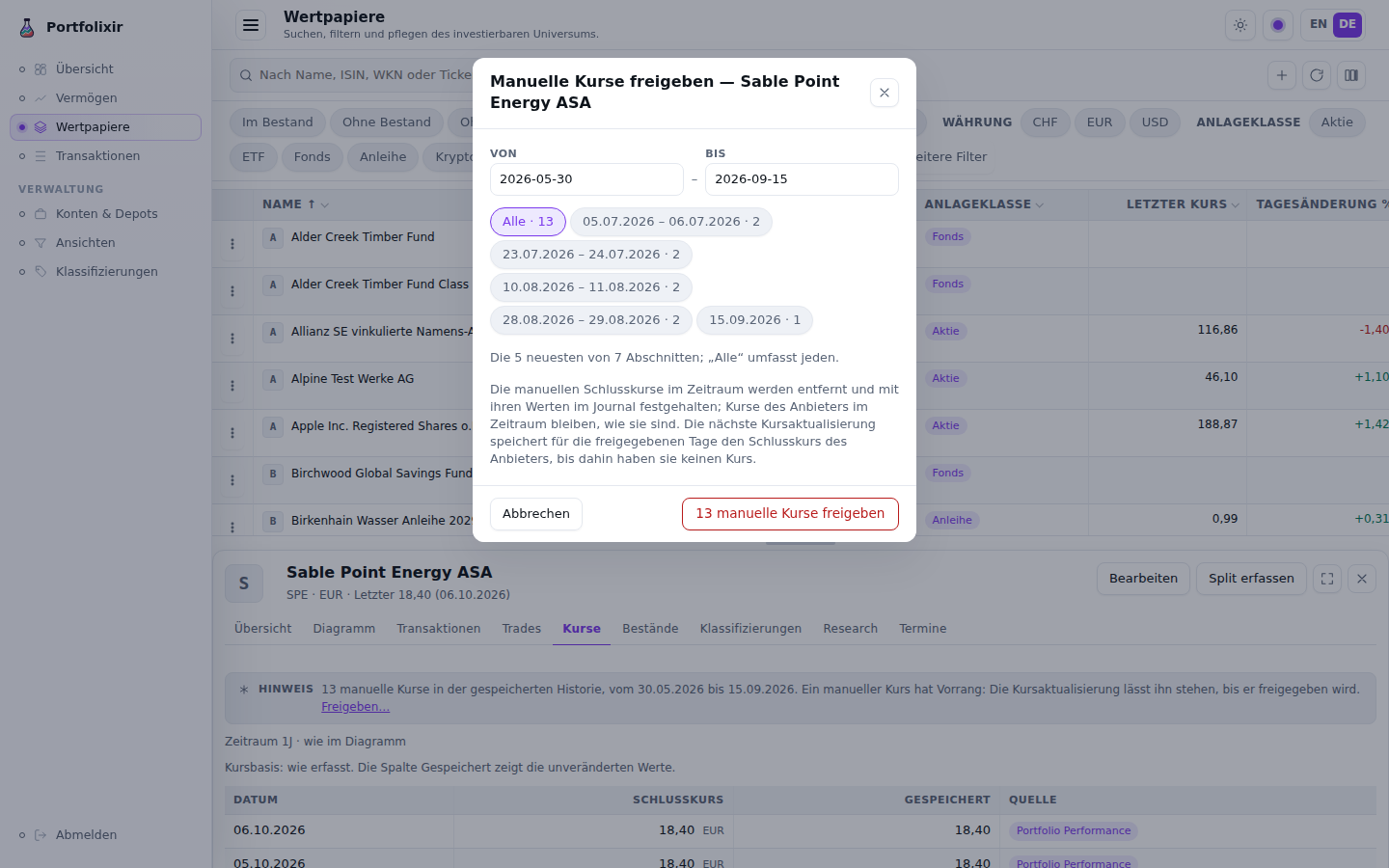
Releasing manual quotes on the synthetic demo dataset, in the German interface.
After the release the tab says how many quotes were released from when to when, with Sync prices as the next step where a sync can help — it syncs this security only — until you dismiss it or move on. Nothing on the page restores a released quote; the journal keeps it. On a phone the dialog opens as a sheet from the bottom.
A sync’s result says how many manual quotes it left standing where the
provider returned a close for the same day (2 manual quotes were left
standing where the provider returned a close.); a sync that skipped a
security says why in words. On a phone the Quotes tab shows each quote as a
two-line row — the date over its source, the close on the right, and the
stored value under it where a split adjusted the close — so the source of
every quote is readable without swiping the table, and the price-basis line
above the rows names that line instead of the table’s Stored column.
Your agent reads the same summary with
GET /api/v1/securities/:security_id/quotes/manual (MCP
portfolixir.quotes.manual) and releases with
portfolixir.quotes.release.
Security Detail Chart
With no selected security, the securities list fills the page workspace.
Clicking a row opens /securities/:id in a vertical split workspace: the list
stays in the upper scrollable pane and the selected detail pane opens below it.
The horizontal separator can be dragged or adjusted with the keyboard on
desktop; mobile uses a stacked layout.
The detail pane’s tab row is a single keyboard stop: Tab lands on the selected tab, Arrow Left/Right move to the previous or next tab (wrapping at the ends), Home and End jump to the first and last, and the tab that receives focus opens its panel. When the page opens on a tab — from a link, a reload, back or forward, or a shared URL — the row scrolls that tab into view, which matters on a phone, where the nine tabs do not fit.
The detail pane shows a server-rendered SVG price chart with:
- Time-range buttons (1M / 3M / 6M / YTD / 1Y / 3Y / 5Y / Max; in German 1J / 3J / 5J). The Quotes tab names the same range.
- A Log scale toggle (logarithmic Y-axis).
- A Show transactions toggle that overlays buy/sell markers from the ledger — shape-coded triangles (▲ buy, ▼ sell), so the direction is readable without colour.
- A Sync prices for this security button.
Stock splits and the price basis (ADR-0028). After a split is booked, the chart and the Quotes tab show a split-adjusted series derived at read time: manually entered (raw, as-traded) closes from before the effective date are divided by the cumulative ratio of all later splits, while provider-synced rows — already back-adjusted by the provider — pass through unchanged, so nothing is ever adjusted twice. The basis in effect (“split-adjusted”, “provider-adjusted”, or mixed) is stated under the chart and on the Quotes tab, whose table keeps a Stored column with the unmodified values — stored quote history is never mutated, and deleting a mistakenly booked split restores every chart and figure exactly. Holdings, valuations, performance series, snapshot comparisons and the securities-list metrics all price through the same basis-aware engine, so a stale pre-split close (or the latest-own-trade-price fallback) never values a post-split position at the unsplit price. For providers that never back-adjust their history, the security’s master data (behind Edit in the detail header) offers a Treat synced quotes as raw toggle that forces the raw basis for its synced rows. A security’s splits, each counted by its own magnitude (2:1 and 1:2 both count 2), multiply to at most 10^12: the split wizard refuses a ratio past that and books nothing, since no real share history comes near it.
The Overview tab reads; Edit writes. The detail pane opens on Overview, a reading surface (issue #801’s sibling, issue #804): six figures — latest price with its date or stale marker, day change, the one-year price return, the held quantity with the depot holding it, the position’s value and the unrealised result with its percentage against the average cost — then the price history as a small chart, then a basis line naming the quote feed, the asset class, the assigned category of a custom classification tree and the WKN and exchange the header does not carry. The thesis state derived from the research log (ADR-0044) and the personal note stand beside them as cards; the thesis card leads to the Research tab, and the note shows a field only after Add or Edit is used. No input renders on the tab before that. The master data — name, identifiers, currency, exchange, asset class, quote feed and its URL, the raw-quotes toggle and the note — lives in the dialog the header’s Edit button opens, the same dialog the list’s row menu opens.
Recording a split. The detail pane’s Record split button opens a guided wizard: enter the ratio as new:old shares (2:1 doubles the share count, 1:10 is a reverse split) and the effective date, and the dialog previews the effect live — quantity before and after the effective date plus the resulting current position, one row per affected portfolio — together with every warning before anything is written: an effective date that predates the imported history (the quantities may already be post-split), and the quote-basis check on the stored closes around the effective date (contradiction or too few quotes to verify). Confirming books the same first-class split ledger event the API and MCP tools create — one journaled transaction per positioned portfolio, atomically — and the chart, holdings and transactions refresh immediately. Invalid input (a 1:1 ratio, a future date, no held position, or a second split on the same day, which is rejected naming the already-booked event) stays inline in the dialog.
Interface behavior
- The active page title and short context line live in the top bar. Page content starts directly with a full-width workspace, so every active menu route uses the available space without a repeated page-level heading or outer page gutters.
- The securities list uses a full-width workspace instead of generic panel chrome; the toolbar remains pinned to the workspace top and the table uses the full horizontal width below it.
- Action feedback is inline, not a floating toast: while a background action runs (price sync, logo lookup) the triggering control shows a busy state, and the result appears in the page flow near the controls — success as a note, a failure as a problem note with the reason. A result stays visible until the next action, a navigation, or its explicit dismiss control; nothing disappears on a timer.
- In a classification tree, categories are collapsed by default (click a category to expand it); searching expands the matching categories. Long security names are truncated to one line with the full name on hover, and the ticker is shown next to the name.
- Each assigned security shows its current quantity (summed across every securities account of every portfolio) and its current market value in the EUR hub, valued from the latest quote (falling back to the latest own trade price, like the portfolio valuation). Holdings and values are loaded once for the whole tree after the page connects, so a large tree never triggers a query per row.
- A Current positions only toggle is on by default. It hides securities no longer held (zero current quantity) so legacy or fully sold assignments do not clutter the tree. Nothing is silently dropped: each category shows a +N without holdings counter for the hidden securities (+N not in the view under a view, counting what the view holds none of), and turning the toggle off reveals them again.
- Each category row aggregates the value and the position count of the securities currently visible in it and its sub-categories, so the totals follow the toggle. Since issue #805 (the 2026-09-12 review’s C8, variant A) the figures stand in named, right-aligned columns under one head — Positions · Value · Cost · Result — an empty category prints 0 positions and a quiet “—” for its value, cost and result instead of a row of zeros (a count is always a number; the dash, muted, says there is no figure to state), the result’s percentage reads “+13.7%”, the hidden-positions count is a muted suffix of the category name, and the result’s basis (“today’s composition, not a period return”) is a basis line with an ⓘ; on the phone the row keeps the value and the result, on two lines: the category’s name (wrapped rather than cut) with its hidden-positions count first, the value and the result under their column heads below it.
- The sidebar is organised into task-oriented areas (ADR-0022): Overview, Wealth, Securities, and Transactions at the top level, plus an Administration group with Accounts & depots, Views, and Classifications. It lists only routes that exist — no disabled roadmap placeholders. Cash flow is a tab of the Wealth area and Import a tab of the Transactions area, not separate menu entries. Buckets have no sidebar entry of their own (ADR-0024): they are managed as chips on the Accounts & depots rows and on the Views page, which the view switcher’s Views link opens.
- On a phone, a section’s tab row (Wealth, Transactions) scrolls sideways instead of wrapping: the tab you are on is in view when a page opens, a fade marks each side beyond which more tabs lie, and the row always comes to rest with a whole tab at its left edge — also at its end, where a little empty space follows the last tab.
- Theme: system, light, and dark modes are supported (the menu is Erscheinungsbild in German).
- Accent: violet, teal, and coral logo accent choices are supported.
- Language: first load follows the browser language when it is English or German. Explicit EN/DE links override the browser language and persist that choice.
- Theme, accent, and language are user preferences and do not affect stored financial values.
- Date fields accept and display ISO dates (
YYYY-MM-DD); the browser’s locale date picker is not used. Every date the page only shows follows the page’s language:DD.MM.YYYYon a German page, ISO on an English one; a month alone reads10.2026/2026-10. The API, MCP and every file the app reads or writes keep ISO. - Chart axes follow it too: the first and last date, the values with the
page’s separators (
12.500/12,500) and a percentage as+10,4%/+10.4%. The axis labels keep one size, 9 px, at every chart width; on a narrow chart (up to about 760 px, as on a phone), or where a value is wider than the space beside the plot, the values sit inside the plot on their grid lines. The one exception to the page’s language is the chart’s hover readout, which still shows the date in ISO form and the price unformatted. - Number fields (quantity, price, fees and taxes, the settlement amount and
rate, a rule’s line, the Tax figures, a cash balance) show and accept figures
in the page’s language: a decimal comma on a German page (
1664,40), a point on an English one. They never show a thousands separator, and they stand right-aligned in tabular digits. The other language’s separator is accepted too (45.60on a German page,45,60on an English one) — except when the figure could be a thousands group (1.664on a German page,1,664on an English one): such a figure reads two ways and is refused on its field with the request to enter it without a thousands separator, as is a figure with two separators (1.664,40) or one grouped with a space or an apostrophe (1 664,40,1'664.40, as bank pages and PDFs print figures). A refused figure saves nothing, and what you typed stays as you typed it. - While values compute, the affected slot shows a placeholder plus a “computing” cue instead of a loading message; headline values settle with a brief count-up. Under a reduced-motion system preference all decorative motion is off and final values render immediately.
- Expensive figures are recomputed by the write that invalidated them, not by the next page you open: after a booking, an import or a quote update they are refreshed in the background, so the cue above is normally something you see once rather than after every change. A burst of writes — an import of a whole export — costs one refresh, not one per row. Until the refresh lands, the previous value is shown, labelled with the time it was computed.
- Signed key figures (TTWROR, IRR/MWR, net flows, the Overview change signal) carry an explicit sign and gain/loss colour at every level; unsigned magnitudes keep the accent colour.
Audit Journal
Every change to financial data is recorded in an append-only audit journal in the
same database transaction as the change itself, so any create, edit, or deletion
stays attributable (who and when) and reversible by inspection (before/after
values) — the safety net for letting an agent write data through the API/MCP.
Market-data sync (quotes and exchange rates) is operational and is not journaled.
The journal is queryable through GET /api/v1/journal and the matching
portfolixir.journal.list MCP tool (see
API and MCP). It covers every area that writes
financial data: securities and the quotes someone enters, portfolios, cash
accounts and depots, bookings (an import’s included), classifications and SOLL
plans, tax records, research notes and events, policy rules, merges, and
buckets and views. A dedicated in-app viewer is a planned follow-up.
Deleting a cash account, a depot or a security never takes anything with it
silently (ADR-0050 §11). A row that bookings still reference — or, for a
security, quotes, research notes or events — is not deleted at all: merge it
into the one you keep instead. An unreferenced row’s bucket links, position
overrides and category assignments are removed first, each through its own
journaled writer, so the journal shows every membership the deletion ended.
A delete that meets a change another write is making at the same moment
keeps the row and says so on the page — “
Non-goals today
- No automatic trading or order execution.
- No bank, broker, or wallet integrations.
- No payment scheduling or settlement workflows.
- No broker PDFs, binary Portfolio Performance workspaces, bank sync, broker sync, or document intake beyond the Portfolio Performance CSV/JSON v1 transaction export workflow.
Savings plans are deliberately not supported. A savings plan only describes an intended recurring contribution, and its target values inevitably diverge from the real executions a broker performs — typically by cent-level differences in price, fee, and quantity. Portfolixir treats the imported, real transactions as the single source of truth for holdings and performance, so modelling separate savings-plan targets would add a parallel set of numbers that never quite matches reality. Recurring contributions are therefore captured simply as the transactions they actually produced.